Module 2 -- Hackers and Cyber Crimes
Index
- Hackers and Cyber Crimes
- Types of Hackers
- Hackers and Crackers
- Sniffing
- Gaining Access
- Escalating Privileges
- Executing Applications
- Hiding Files
- Covering Tracks
- Viruses
- Worms
- Trojans
- Backdoors
Hackers and Cyber Crimes
Important Definitions
- Hacker: A hacker is an individual who uses their technical skills to gain unauthorized access to computer systems, networks, or data. Hackers can be malicious (black-hat) or benevolent (white-hat). (There are more types than this but these are two most widely known.)
- Cybercrime: Cybercrime refers to any criminal activity that involves a computer or network, such as hacking, identity theft, phishing, and malware distribution.
2. The Intuition
A Real-World Analogy
Imagine your home is like a digital fortress. You have locks on the doors (passwords), alarms set up (firewalls), and surveillance cameras monitoring the perimeter (intrusion detection systems). Just as you wouldn't leave your front door open or ignore suspicious activity, computer users must take similar precautions to protect their digital assets.
3. Step-by-Step Breakdown with Examples
The Core Mechanics
Here's a step-by-step guide on how hackers and cybercriminals operate:
-
Reconnaissance: Hackers gather information about potential targets, such as network infrastructure, system vulnerabilities, and user behavior.
- Example: Imagine a hacker is targeting a company's email server. They might scan the network to identify open ports, analyze network traffic patterns, and research employee login habits.
-
Exploitation: Hackers use discovered vulnerabilities or social engineering tactics to gain unauthorized access.
- Example: The hacker uses a phishing email to trick an employee into revealing their login credentials or exploiting a known vulnerability in the email server's software.
-
Post-Exploitation: Hackers maintain access, gather sensitive data, and cover their tracks.
- Example: The hacker creates a backdoor account on the compromised email server, steals sensitive data (e.g., employee salaries), and erases logs to avoid detection.
-
Covering Tracks: Hackers attempt to conceal their activities and avoid detection by law enforcement or security teams.
- Example: The hacker uses encryption tools to hide their communications with other hackers or deletes logs to cover their tracks.
Important Definitions
-
Social Engineering: Social engineering refers to the use of psychological manipulation to trick individuals into divulging sensitive information or performing certain actions that compromise computer systems or networks.
-
Vulnerability: A vulnerability is a weakness in a computer system, network, or application that can be exploited by an attacker.
-
Encryption: Encryption is the process of converting plaintext data into unreadable ciphertext to protect it from unauthorized access.
-
Firewall: A firewall is a network security system that monitors and controls incoming and outgoing network traffic based on predetermined security rules.
Applications and Relevance
Cybercrime affects various industries, including:
- Finance: Identity theft, credit card fraud, and money laundering.
- Healthcare: Data breaches, medical identity theft, and patient information compromise.
- Government: National security breaches, intellectual property theft, and sensitive data leaks.
Common Pitfalls and Considerations
Common Misunderstandings
-
Lack of Awareness: Many individuals are unaware of the risks and consequences of cybercrime, making them more susceptible to attacks.
-
Insufficient Security Measures: Organizations often underestimate the importance of cybersecurity, leading to inadequate protection against threats.
Limitations
- Limited Resources: Law enforcement agencies and security teams may struggle with limited resources (e.g., personnel, budget) to effectively combat cybercrime.
- Evolving Threats: Cybercriminals continually develop new tactics, techniques, and procedures (TTPs), making it essential for defenders to stay up-to-date with the latest threats.
The Final Takeaway
Cybersecurity is a critical concern that requires constant vigilance and proactive measures to protect against hackers and cybercriminals. By understanding the foundational concepts, recognizing common pitfalls, and staying informed about evolving threats, individuals can better defend themselves and their organizations against these malicious activities.
Types of Hackers
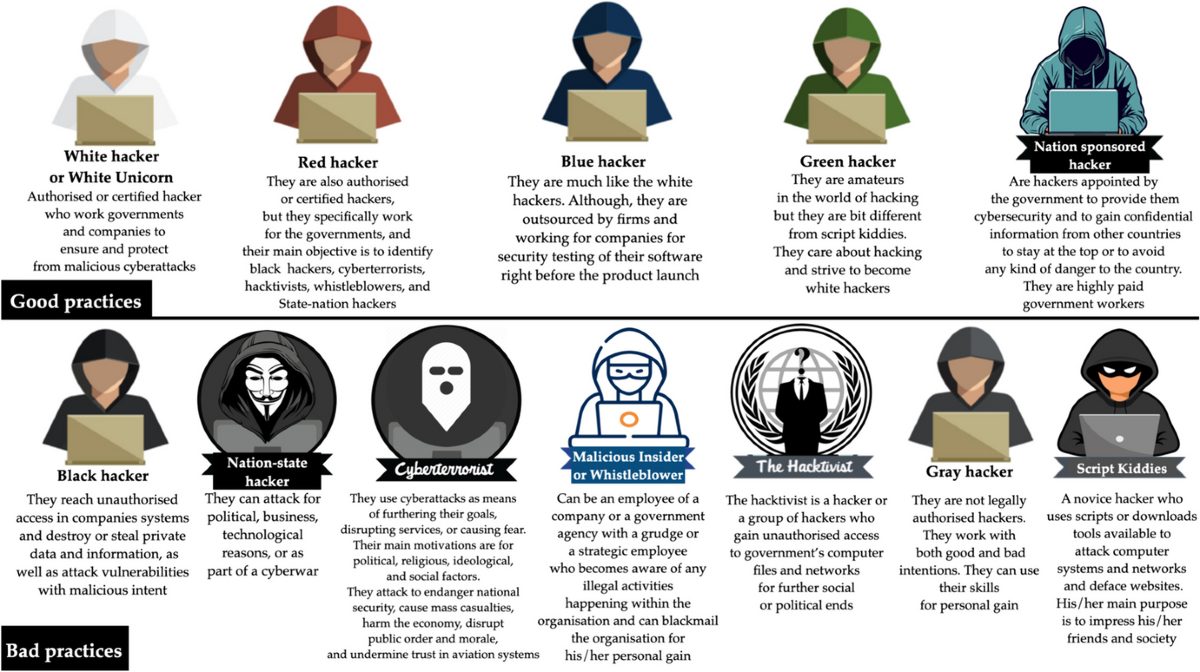
The Intuition
A Real-World Analogy
Imagine a group of skilled lockpickers, each with their own unique set of skills and motivations. Just as these individuals might use their talents for good or ill, hackers can be categorized into different types based on their intentions and actions.
Step-by-Step Breakdown with Examples
The Core Mechanics
Let's explore the main types of hackers:
- White Hat Hackers: Also known as ethical hackers, these individuals use their skills to help organizations improve their cybersecurity. They might identify vulnerabilities and report them to the relevant authorities.
Example: A white hat hacker named Sarah is hired by a company to test their network security. She discovers a vulnerability in the system and reports it to the IT department, who then fixes the issue.
| Step | Description |
|---|---|
| 1. Identify Vulnerability | Sarah uses her skills to find a weakness in the company's network. |
| 2. Report Finding | Sarah informs the IT department about the vulnerability. |
| 3. Fix Issue | The IT department patches the vulnerability, making the system more secure. |
- Black Hat Hackers: These individuals use their skills for malicious purposes, such as stealing sensitive information or disrupting systems.
Example: A black hat hacker named Alex is part of a group that steals credit card numbers from an online retailer's database.
| Step | Description |
|---|---|
| 1. Identify Vulnerability | Alex finds a weakness in the retailer's database. |
| 2. Steal Data | Alex extracts sensitive information, such as credit card numbers. |
| 3. Sell or Use Illegally | Alex sells the stolen data on the dark web or uses it for personal gain. |
- Gray Hat Hackers: These individuals walk a fine line between white and black hat hacking. They might use their skills to identify vulnerabilities, but then sell their findings to the highest bidder.
Example: A gray hat hacker named Jack discovers a vulnerability in a popular software program. Instead of reporting it to the developers, he sells his findings to a rival company that uses the information to gain an advantage.
| Step | Description |
|---|---|
| 1. Identify Vulnerability | Jack finds a weakness in the software program. |
| 2. Sell Information | Jack sells his discovery to a rival company. |
| 3. Use for Personal Gain | The rival company uses the information to gain an advantage, while Jack profits from the sale. |
4. Important Definitions and Tools
- Vulnerability: A weakness in a system or network that can be exploited by hackers.
- Exploit: A piece of code or technique used to take advantage of a vulnerability.
Applications and Relevance
Hackers are essential in various industries, including:
-
Cybersecurity: White hat hackers help organizations improve their security by identifying vulnerabilities and reporting them.
-
Penetration Testing: Gray hat hackers test systems to identify weaknesses and help companies strengthen their defenses.
6. Common Pitfalls and Considerations
Limitations and Misconceptions
-
Misconception: All hackers are malicious. Reality: Many hackers use their skills for good, such as identifying vulnerabilities and reporting them.
-
Limitation: Gray hat hacking can be a gray area between white and black hat hacking, making it difficult to categorize.
The Final Takeaway
In conclusion, understanding the different types of hackers is crucial in today's digital landscape. By recognizing the motivations and actions of these individuals, we can better protect ourselves and our organizations from potential threats. Remember that not all hackers are malicious, and some use their skills for good.
Hackers and Crackers
The Core Mechanics
Let's break down the main differences between hackers and crackers:
-
Motivation: Hackers often have a genuine interest in exploring computer systems, identifying vulnerabilities, and improving security. Crackers, on the other hand, are motivated by personal gain or malicious intent.
-
Methods: Hackers may use their skills to identify and report vulnerabilities, while crackers exploit these weaknesses for personal benefit.
-
Impact: Hackers can contribute to the improvement of computer systems and networks, whereas crackers cause harm and disrupt digital systems.
Example:
Suppose a hacker discovers a vulnerability in a company's network. Instead of exploiting it for personal gain, they notify the company and provide guidance on how to fix the issue. This helps improve the security of the network and protects sensitive data.
On the other hand, a cracker might exploit this same vulnerability to steal sensitive information or disrupt business operations.
4. Important Definitions
-
Hacker: A person who uses their skills to identify vulnerabilities and improve computer systems and networks.
-
Cracker: A person who exploits vulnerabilities for personal gain or malicious intent.
-
Security: The practice of protecting computer systems, networks, and data from unauthorized access, use, disclosure, disruption, modification, or destruction.
5. Applications and Relevance
Real-World Uses
Hackers and crackers play crucial roles in various industries:
-
Cybersecurity: Hackers can help improve security by identifying vulnerabilities and providing guidance on how to fix them. Crackers, on the other hand, can cause harm by exploiting these weaknesses.
-
Computer Forensics: Hackers can assist in analyzing digital evidence and reconstructing cybercrimes. Crackers might use their skills for malicious purposes.
Common Pitfalls and Considerations
Limitations and Risks
When dealing with hackers and crackers, it's essential to consider the following:
- Misconceptions: Avoid stereotyping or stigmatizing individuals based on their profession or actions.
- Motivation: Understand that motivations can vary greatly between hackers and crackers.
- Impact: Recognize the potential consequences of hacking or cracking activities.
7. The Final Takeaway
The main takeaway is that hackers and crackers are distinct entities with different motivations, methods, and impacts. While hackers can contribute to improving computer systems and networks, crackers cause harm and disrupt digital systems.
Cyber-Attacks and Vulnerabilities
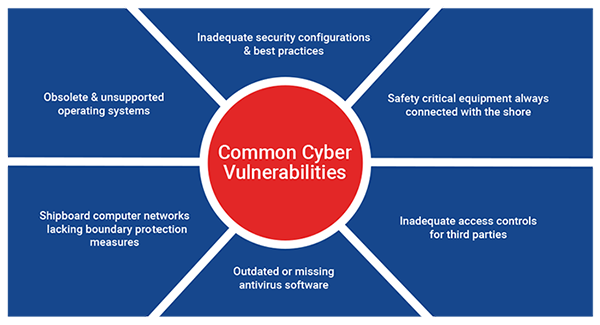
The Core Mechanics
Cyber-attacks can be categorized into several types:
-
Network-based attacks: These involve compromising network devices or exploiting vulnerabilities in network protocols.
-
Host-based attacks: These target individual devices, such as computers or servers, by exploiting software vulnerabilities or using malware.
Let's focus on a specific example of a network-based attack: the Man-in-the-Middle (MitM) attack.
Example:
Suppose you're using a public Wi-Fi network to access your online banking account. An attacker intercepts your internet traffic and creates a fake website that looks like your bank's login page. You enter your credentials, thinking you're accessing your account, but the attacker is actually capturing your login information.
Step-by-Step Breakdown:
-
Initial Connection: You connect to the public Wi-Fi network.
-
Interception: The attacker intercepts your internet traffic and creates a fake website that looks like your bank's login page.
-
Fake Login Page: You enter your credentials, thinking you're accessing your account.
-
Data Capture: The attacker captures your login information.
This is a classic MiTM attack which uses phishing on top.
Key Concepts and Formulae
Important Definitions and Tools
These two we already know.
-
Vulnerability: A weakness in a system or network that an attacker can exploit to gain unauthorized access or disrupt services.
-
Exploit: A piece of code or technique used to take advantage of a vulnerability and achieve malicious goals.
Formula:
This formula highlights the importance of identifying weaknesses (vulnerabilities) and implementing effective countermeasures to mitigate them.
5. Applications and Relevance
Cyber-attacks and vulnerabilities affect various industries, including:
-
Finance: Online banking and financial transactions are vulnerable to MitM attacks.
-
Healthcare: Patient data and medical records can be compromised by exploiting vulnerabilities in healthcare systems.
-
Government: Government agencies and institutions rely heavily on digital infrastructure, making them targets for cyber-attacks.
Connection to Machine Learning
Machine learning plays a crucial role in detecting and preventing cyber-attacks. Techniques like:
-
Anomaly detection: Identifying unusual patterns in network traffic or system behavior can help detect potential attacks.
-
Behavioral analysis: Analyzing the behavior of devices, networks, and users can help identify suspicious activity.
These machine learning-based approaches can be used to enhance security measures and reduce the impact of cyber-attacks.
6. Common Pitfalls and Considerations
Limitations and Challenges
When dealing with cyber-attacks and vulnerabilities:
-
Lack of awareness: Insufficient understanding of cybersecurity threats and vulnerabilities can lead to ineffective countermeasures.
-
Insufficient resources: Limited budget, personnel, or technology can hinder the ability to detect and respond to attacks.
-
Complexity: Cybersecurity is a constantly evolving field, making it challenging to stay up-to-date with the latest threats and mitigation strategies.
7. The Final Takeaway
The key takeaway from this tutorial is that cyber-attacks and vulnerabilities are complex issues that require a deep understanding of foundational concepts, security measures, and machine learning-based approaches. By recognizing the importance of these factors and staying vigilant, we can better protect our digital assets and mitigate the impact of cyber-attacks.
Malware threats
The Core Mechanics
Malware can be categorized into several types based on its behavior:
-
Virus: A virus is a type of malware that replicates itself by attaching to other programs or files.
- Example: Imagine a virus spreading through a network, infecting multiple computers and devices.
-
Worm: A worm is a type of malware that can spread without the need for human interaction.
- Example: Picture a worm exploiting a vulnerability in a software application, allowing it to propagate rapidly across a network.
-
Trojan horse: A Trojan horse is a type of malware disguised as legitimate software.
- Example: Envision a Trojan horse masquerading as an antivirus program, actually containing malicious code that steals sensitive information.
Step-by-Step Guide
-
Infection: Malware infects a computer system by exploiting vulnerabilities or using social engineering tactics (e.g., phishing emails).
-
Propagation: The malware spreads to other systems or devices within the network.
-
Execution: The malware executes its malicious payload, which can include:
- Data theft
- System compromise
- Denial-of-service attacks
Numerical Example: Virus Infection
Suppose a virus infects a computer running Windows 10:
| Step | Action |
|---|---|
| 1. Infection | User downloads and runs a malicious executable from an untrusted source. |
| 2. Propagation | The virus spreads to other computers on the network by exploiting vulnerabilities in software applications. |
| 3. Execution | The virus executes its payload, encrypting files and demanding a ransom payment. |
4. Key Concepts and Formulae
Important Definitions and Tools
- Malware analysis: A process of analyzing malware to understand its behavior, functionality, and potential impact.
- Reverse engineering: A technique used to analyze software or malware by disassembling the code and understanding its inner workings.
5. Applications and Relevance
Malware threats are relevant in various industries and fields, including:
-
Cybersecurity: Understanding malware behavior is crucial for developing effective countermeasures.
-
Network security: Identifying and mitigating malware threats helps prevent data breaches and system compromise.
-
Digital forensics: Analyzing malware is essential for investigating cybercrimes and recovering stolen data.
6. Common Misunderstandings
- Overlooking human factors: Failing to consider social engineering tactics and user behavior when analyzing malware threats.
- Underestimating complexity: Assuming malware is simple or predictable, leading to ineffective analysis or mitigation strategies.
7. The Final Takeaway
Key Takeaway
Malware threats are a significant concern in today's digital landscape. By understanding the foundational concepts, step-by-step breakdown, and key concepts, you'll be better equipped to analyze and mitigate these threats. Remember that malware is like a cyber-thief – it requires careful analysis and effective countermeasures to stay ahead of its malicious intentions.
Sniffing
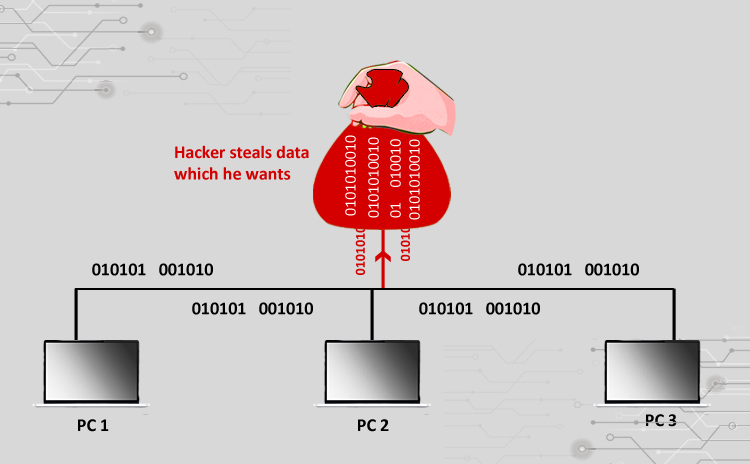
The Intuition
Imagine you're at a coffee shop, and you want to listen in on the conversation between two friends sitting next to you. You'd want to capture every word they say, not just parts of their conversation. Sniffing is like being able to record and analyze every packet of data transmitted over a network, allowing you to understand what's happening at the packet level.
Step-by-Step Breakdown with Examples
The Core Mechanics
Sniffing involves capturing and analyzing packets as they flow through a network. Here's a step-by-step guide:
-
Choose a Sniffer Tool: Select a tool that can capture and analyze packets, such as
WiresharkorTcpdump. -
Set Up the Sniffer: Configure the sniffer to capture packets on a specific interface (e.g., Ethernet) and set the filter to capture all packets.
-
Capture Packets: Start capturing packets, which will be stored in a file.
-
Analyze Captured Packets: Open the captured packet file in the sniffer tool and analyze the contents.
Practical Example worked out with screenshots.
So, in this example, I have setup a lab, with a VM (virtual machine) of Kali Linux (A Linux Distribution used for hacking) and another intentionally vulnerable VM of an OS called Metasploitable2, which is built for learning cybersecurity.
In this example, we will use Wireshark to grab packets going in and out from the MSF2(short for metasploitable2) OS.
Step 0: Get to know the IP address of the target somehow.
Since that's done with the help of either proprietary or otherwise illegal tools, we wont need them here, as we have a controlled lab, where we know the IP of the victim directly.
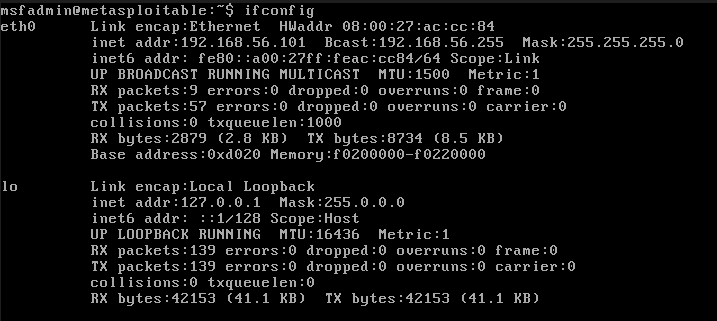
As we can see on the eth0 interface, which is the default ethernet port, in the inet flag, the IP address of the target is:
192.168.56.101
Now, we ping the IP address to see if the target is running or not.
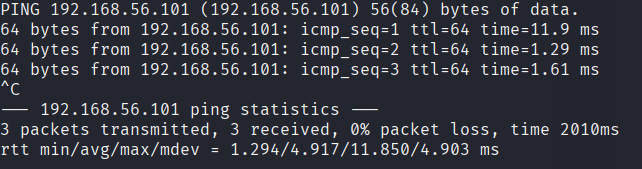
We see that the target can be pinged, which is good.
So this is our Kali Linux Desktop.

Step 1. Boot up Wireshark
We click on the Start Menu, and search for wireshark
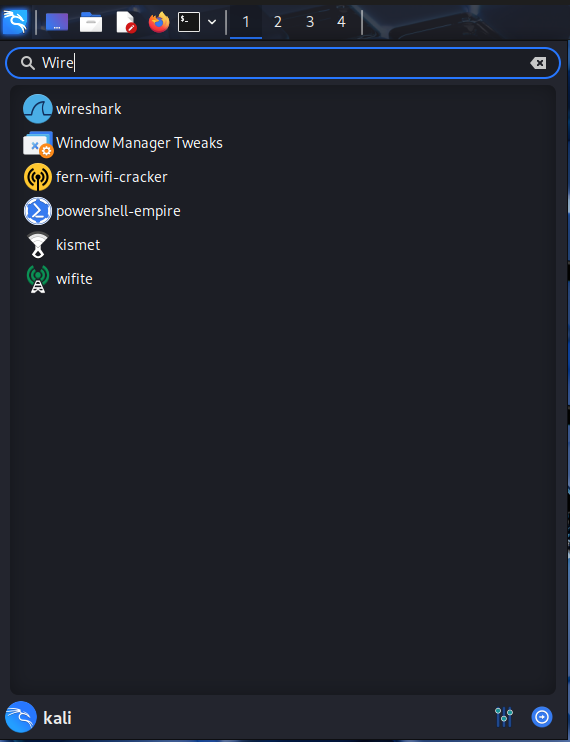
And this is homescreen of the wireshark application:
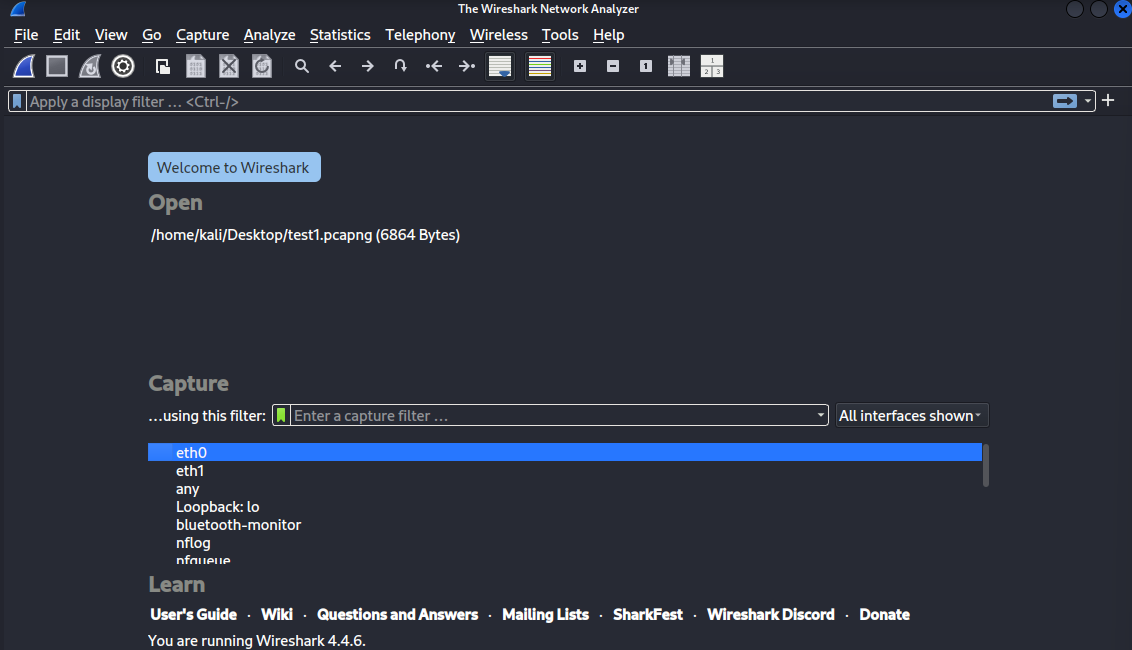
Step 2: Enter the IP address of the attacker with the required filter.
The filter here is basically the type of packets you want to capture.
Capturing all packets without any filter can cause cluttering on our end, and also slow down the network, raising suspicions.
The Kali Linux VM's IP address (the inet flag ) is:
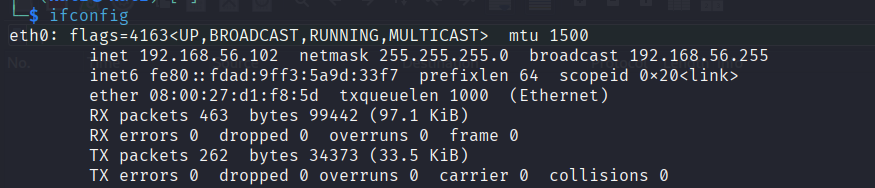
So, in the filter text box we type host 192.168.56.102 for now.

This is the initial screen after selecting a host:
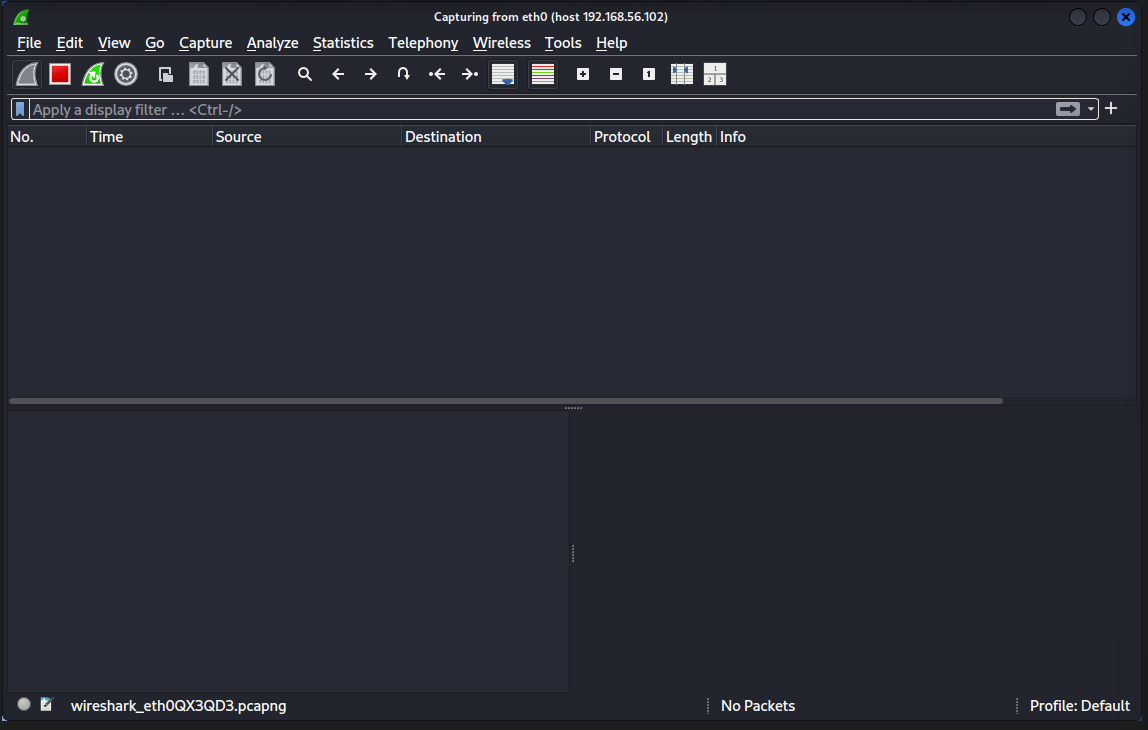
And it seems like Wireshark has already captured a packet before we applied any filter.
This seems to be some basic DHCP (Module 3 -- Network Layer -- Computer Networks#5. DHCP in Modern Networks) and ARP Requests(Module 3 -- Network Layer -- Computer Networks#1. ARP (Address Resolution Protocol)), since I have also configured my Kali VM on the NAT adapter so that it can have access to the internet.
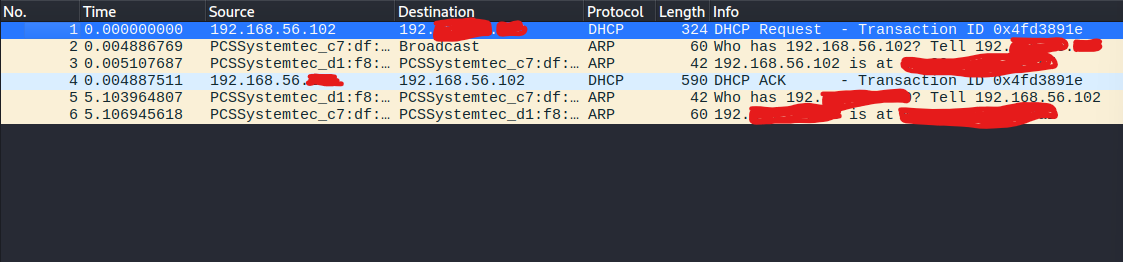
Due to security reasons, I had to block out any and all other addresses that might be related to my real network. I don't really want to be doxed.
Step 4: Initiate an FTP session from the target end.
Now let's set the filter to ftp instead to only focus on ftp packets.
Now, in order to capture FTP packets going in and out of the target, we need to connect our Kali Linux instance to the target so that our sniffer can capture the ftp packets.
So the command would be:
ftp ipaddress
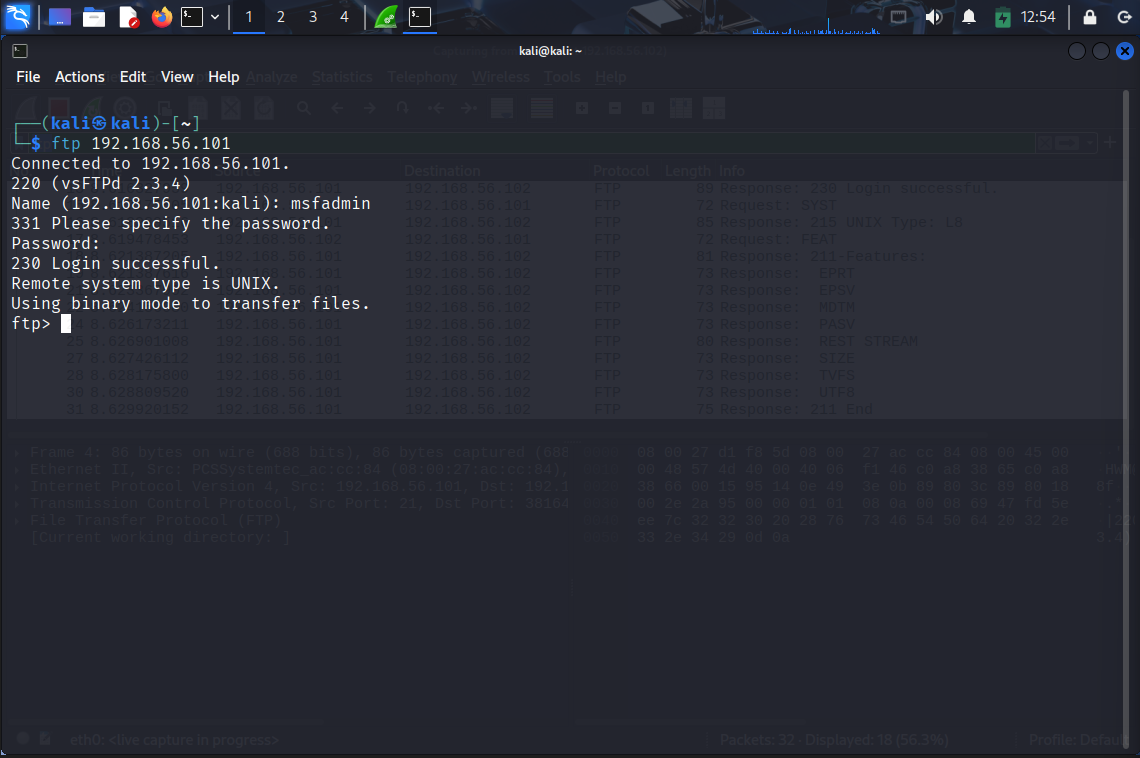
And we can see behind the terminal that wireshark has already caught the initial packets.

Here, since the VM is intentionally outdated and vulnerable, we can see the login username and password in plaintext, indicating that this FTP(Module 5 -- Application Layer -- Computer Networks#FTP (File Transfer Protocol)) server uses the TELNET(Module 5 -- Application Layer -- Computer Networks#TELNET (TELecommunication NETwork)) protocol as the backend, which used to send data in just plain text.
Step 5: Capture incoming and outgoing FTP packets from the target system.
So, for this exercise, I created a dummy text file called lol.txt in the msf2 VM.
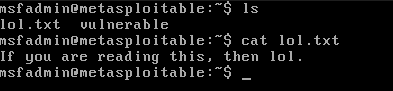
Let's try to simulate a file transfer where we download this file and pretend we are some other client connected to this server, and see whether our packet sniffer grabs the file and it's contents or not.
Firstly, we set the mode to ascii, for text and ascii files.

Next we turn off passive mode in the FTP server so we can actively initiate and choose which file we want to get.

Now we hit ls to get the directory listing:

Lastly we download the lol.txt using the get command.

Well, let's see what wireshark captured.

It did get the file, let's click on the associated packet and check it's contents:
To do that, we need to do some careful analysis.

Let's open the TCP stream on this packet.
The TCP stream is basically the stream/log of whatever happened in the FTP session.
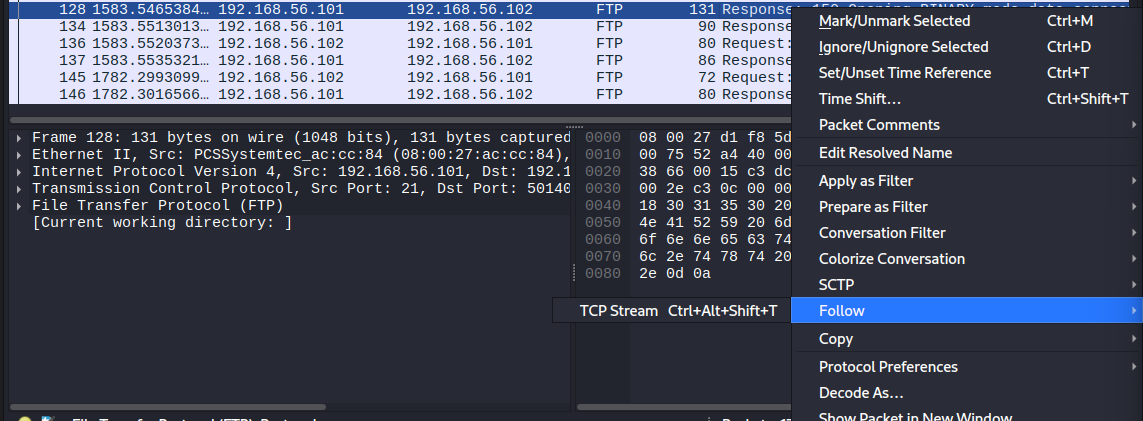
Now we see, before the file was transmitted a new port was opened:
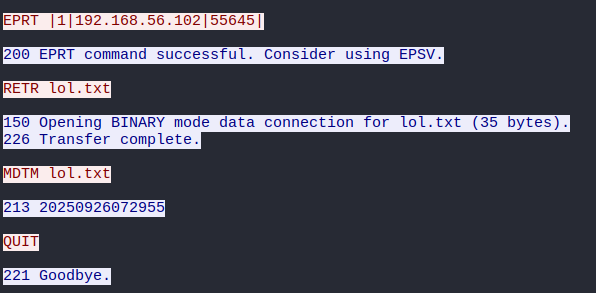
Let's track down this port using the filter: tcp.port == 55645

That narrows down our search, and that packet titled "FTP Data: 35 Bytes", looks like it might have what we need:
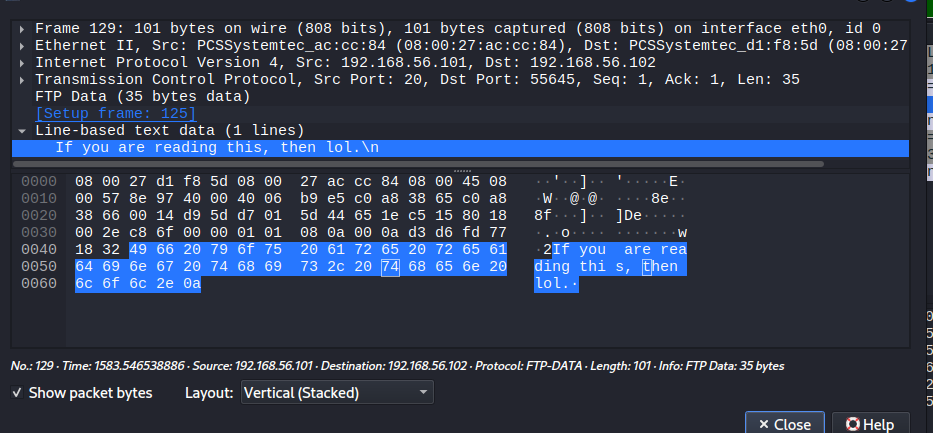
And sure enough, there's the contents of the lol.txt file.
We have successfully captured the details of an FTP file transfer. That's enough for sniffing.
Step 6: Save the captured packet details.
Wireshark saves to a file format of .pcapng. This can be then later opened again using the Wireshark GUI to examine the contents of all the packets captured during that session.
Other Sniffing Modes.
This was just one comprehensive example, but we can also capture all sorts of packets, such as TCP, FTP, even unsecured HTTP packets, or encrypted HTTPS/SSH packets. All depends on the scope of data capture.
Important Definitions and Tools
- Packet Capture: The process of recording and storing packets as they flow through a network.
- Packet Analysis: The process of examining and interpreting the contents of captured packets.
Formula:
This formula represents the ratio of captured packets to total packets, giving us an idea of how effective our packet capture is.
Applications and Relevance
Sniffing has various applications in:
-
Network Troubleshooting: Sniffing can help identify issues with network connectivity, packet loss, or corruption.
-
Security Analysis: Sniffing can be used to detect and analyze malicious traffic, such as malware or hacking attempts.
-
Network Optimization: Sniffing can help optimize network performance by identifying areas where packets are being dropped or delayed.
Common Pitfalls and Considerations
When sniffing, it's essential to consider:
-
Privacy Concerns: Sniffing may capture sensitive data, such as passwords or credit card information.
-
Network Congestion: Capturing too many packets can cause network congestion and slow down traffic.
-
Filtering: Carefully setting filters is crucial to avoid capturing unnecessary packets.
7. The Final Takeaway
Sniffing is a powerful tool for understanding network behavior, troubleshooting issues, and detecting security threats. By capturing and analyzing packets, we can gain valuable insights into the underlying network infrastructure and improve overall network performance.
Gaining Access
The Intuition
Imagine you're trying to get into a secure building. You need to find a way to bypass the security guards, unlock the doors, and gain access to the restricted area. This is similar to what hackers do when they try to gain access to computer systems or networks.
Step-by-Step Breakdown with Examples
Gaining access typically involves several steps:
1. Reconnaissance
Gather information about the target system, network, or device.
* Example: Imagine you're trying to get into a building. You would first try to find out what kind of security measures are in place, who is guarding the entrance, and what kind of doors they have.
| Step | Description |
|---|---|
| 1 | Reconnaissance |
| Gather information about the target system, network, or device. |
In our previous example, Step 0 Get to know the IP address of the target somehow., we already know how to get the victim, msf2 VM's IP address, for our lab purposes.
Firstly, we have to ping the target to see if it's running or not.
ping -c 4 target
The -c 4 flag tells the ping command to only ping till 4 hops and then quit.
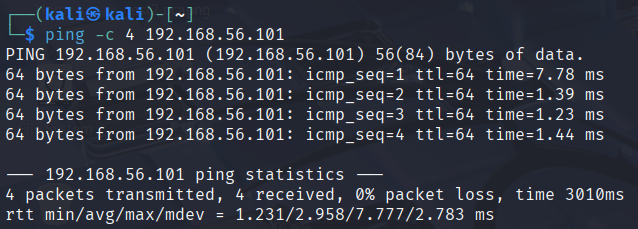
The target is running. Good.
Next up, we have to scan and find out what services are running on which ports.
For that, we use a command-line tool called nmap.
The command for that will be this:
nmap -sS -sV -A target
The flags are as follows:
-sS:SYN(theSYNpacket used in TCP) scan, stealthy.-sV: Detect the versions of the services running.-A: Aggressive scan (OS, services, scripts).
This is the output (the list goes on...)
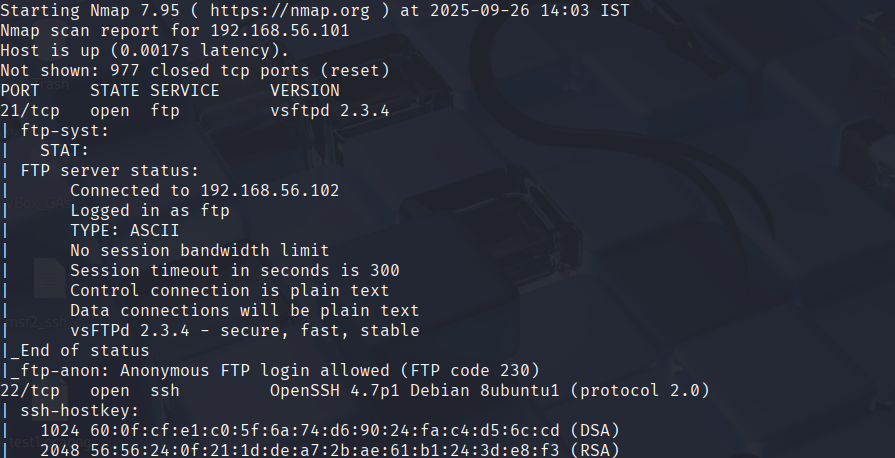
Primarily we can see the top two services, are FTP and SSH running on ports 21 and 22, respectively.
2. Enumeration (Vulnerability Identification)
Vulnerability Identification: Identify potential vulnerabilities in the target system, network, or device.
Example: You find out that the building's security cameras are old and outdated. This could be a vulnerability.
| Step | Description |
|---|---|
| 2 | Vulnerability Identification |
| Identify potential vulnerabilities in the target system, network, or device. |
Here we can see that the version of SSH is really outdated, so that seems like a good vulnerability.
3. Exploitation
Exploitation: Exploit the identified vulnerability to gain access.
* Example: You use your knowledge of old security cameras to bypass them and sneak into the building.
| Step | Description |
|---|---|
| 3 | Exploitation |
| Exploit the identified vulnerability to gain access. |
In real situations, attackers get the target's IP address, scan the ports for running services, and try to get SSH or any other service's access (in real situations it's often combined with password cracking methods, like bruteforcing with wordlists (lists of commonly used passwords)).
However, in our case, since it's a controlled lab system, we can now can just SSH in, as we already know the IP address and credentials to the target system.
The SSH command syntax is:
ssh hostusername@hostipaddress

Typically SSH commands don't need other parameters like using the ssh-rsa algorithms, but since our intentionally vulnerable VM is so old, it uses ssh-rsa.
4. Post-Exploitation
Post-Exploitation: Once you've gained access, you need to maintain it and potentially escalate your privileges.
* Example: You use your new found access to unlock doors and move freely within the building.
| Step | Description |
|---|---|
| 4 | Post-Exploitation |
| Maintain access and potentially escalate privileges. |
This is followed up more in Escalating Privileges
Applications and Relevance
Gaining access is a crucial step in penetration testing, which is used to:
- Test Network Security: Identify vulnerabilities and weaknesses in network security systems.
- Improve System Security: Develop strategies to prevent unauthorized access and protect sensitive information.
Common Pitfalls and Considerations
Limitations and Risks
- Ethical Hacking: Always follow ethical hacking guidelines and respect the privacy of others.
- Legal Consequences: Be aware of legal consequences for unauthorized access or data breaches.
The Final Takeaway
Gaining access is a critical step in penetration testing, requiring a combination of reconnaissance, vulnerability identification, exploitation, and post-exploitation techniques. By understanding the importance of gaining access and the potential risks involved, you can better protect your systems and networks from unauthorized attacks.
Escalating Privileges
What You Need to Know First
Before diving into privilege escalation, it's essential to understand some fundamental concepts related to computer systems and security.
- Privileges: In a computer system, privileges refer to the level of access or authority granted to a user or process. Think of privileges like levels in a video game – each level has its own set of rules and capabilities.
- Access Control Lists (ACLs): ACLs are lists of permissions that define what actions can be performed on a resource (e.g., file, directory, network port). These lists help determine who can access or modify specific resources.
- User Accounts: User accounts are the identities used to authenticate and authorize users in a system. Each account has its own set of privileges and access controls.
2. The Intuition
A Real-World Analogy
Imagine you're at a restaurant, and you want to order something from the kitchen. You can't just walk into the kitchen and start making your own food because that's not allowed. Instead, you need to ask the waiter (who has higher privileges) to place the order for you.
In this scenario:
- The kitchen represents a computer system with sensitive resources.
- The waiter represents an administrator or user with elevated privileges.
- You represent a regular user trying to access those resources.
Privilege escalation is like sneaking into the kitchen and ordering something without asking the waiter. It's when an attacker gains unauthorized access to higher privileges, allowing them to perform actions they wouldn't normally be able to do.
3. Step-by-Step Breakdown with Examples
The Core Mechanics
Here's a step-by-step guide on how privilege escalation attacks work:
- Initial Access: An attacker gains initial access to the system by exploiting a vulnerability, cracking a weak password, or using social engineering tactics.
- Privilege Identification: The attacker identifies the privileges associated with the user account they've gained access to. This might involve analyzing ACLs, permissions, and access controls.
- Privilege Escalation: The attacker exploits vulnerabilities in the system, misuses existing privileges, or uses social engineering techniques to gain higher privileges. For example:
- An attacker with read-only access to a file system might exploit a vulnerability to gain write access.
- A user with limited network access might use a phishing email to gain administrative privileges.
Let's consider an example:
Suppose an attacker gains initial access as a regular user (user1) on a Linux system. They identify that user1 has read-only access to the /home directory.
To escalate their privileges, they exploit a vulnerability in the sudo command (a common Unix utility for executing commands with elevated privileges). This allows them to gain write access to the /etc directory, which is typically restricted to administrators only.
Here's a numerical example:
| Step | Command/Action | Result |
|---|---|---|
| 1 | sudo -l |
Lists available sudo commands for user1. |
| 2 | sudo -u root -i |
Exploits the vulnerability, gaining write access to /etc. |
4. Key Concepts and Formulae
Important Definitions and Tools
- Privilege Escalation: The act of gaining unauthorized access to higher privileges in a system.
- Vulnerability: A weakness or flaw in a system that can be exploited by an attacker.
No specific formulae are required for this topic, as it's more focused on the conceptual understanding of privilege escalation attacks.
5. Applications and Relevance
Real-World Uses
Privilege escalation is used in various industries and fields, such as:
- Cybersecurity: Understanding privilege escalation techniques helps security professionals develop effective countermeasures to prevent attacks.
- System Administration: System administrators need to be aware of privilege escalation risks to ensure the security and integrity of their systems.
6. Common Pitfalls and Considerations
Key Takeaways
When dealing with privilege escalation, keep in mind:
- Vulnerability Management: Regularly patch vulnerabilities to prevent exploitation.
- Access Control: Implement robust access controls to restrict unauthorized access to sensitive resources.
- Privilege Separation: Use privilege separation techniques to limit the damage caused by a compromised account.
7. The Final Takeaway
Key Summary
Privilege escalation is a critical concept in cybersecurity, where an attacker gains unauthorized access to higher privileges in a system. By understanding the foundational concepts, step-by-step process, and key takeaways, you'll be better equipped to prevent and respond to privilege escalation attacks.
Executing Applications
This part is mostly about executing applications once we have escalated privileges.
Nothing much to be explained here, besides that once we have superuser/sudo access, we can pretty much execute anything on the target system.
Hiding Files
File System Basics
A file system typically consists of:
- Directories: Folders where files are stored.
- Files: Collections of data, such as text documents or images.
- Attributes: Properties that describe a file or directory, like its name, size, and permissions.
Step-by-Step Breakdown with Examples
The Core Mechanics
To hide a file on most operating systems, follow these steps:
- Create a new directory: Make a new folder to store your hidden files.
- Set the directory's attributes: Use the operating system's built-in tools or programming languages (like Python) to set the "hidden" attribute on the directory.
Numerical Example
Let's use Python to create a hidden directory and hide a file:
import os

# Create a new directory
new_dir = 'my_hidden_directory'
os.mkdir(new_dir)

# Set the directory's attributes
os.chmod(new_dir, 0o700)  # Set permissions to 700 (rwx for owner)
os.system(f"attrib +h {new_dir}")  # Hide the directory

# Create a file within the hidden directory
file_name = 'my_hidden_file.txt'
with open(os.path.join(new_dir, file_name), 'w') as f:
    f.write('This is my hidden file!')
Key Concepts and Formulae
Important Definitions and Tools
- Hidden attribute: A flag that indicates a directory or file should be hidden from view.
- File system permissions: Rules that control access to files and directories based on user identity and group membership.
Applications and Relevance
Real-World Uses
Hiding files is useful in various scenarios:
- Security: Hide sensitive data or configuration files to prevent unauthorized access.
- Organization: Keep personal documents or projects organized by hiding them from view.
- Data Protection: Conceal backup files or archives to ensure they're not accidentally deleted.
Common Pitfalls and Considerations
Avoiding Mistakes
When hiding files, be mindful of:
- File system limitations: Some file systems may not support hidden attributes or have limited capabilities.
- Security risks: Hiding sensitive data can create security vulnerabilities if not done properly.
- Data integrity: Ensure that hidden files are still accessible and recoverable in case of data loss.
Other methods of hiding files
A quite popular method of hiding files in cybersecurity is by Steganography.
Steganography is the art of hiding the existence of information within another non-secret message or object, such as hiding a digital file within an image or video, making the hidden communication imperceptible to unauthorized observers. Unlike cryptography, which scrambles the message content, steganography aims to make the very presence of the secret data unknown. It involves using a "cover" media to conceal a "secret" message, with key principles including embedding capacity, imperceptibility, and robustness.
How it Works (Digital Examples)
-
Image Steganography:
The most common digital application involves hiding a text message or another image by altering the least significant bits (LSB) of the pixels in the cover image.
-
Null Ciphers:
A traditional form where secret messages are embedded by taking certain letters from seemingly normal text.
The Final Takeaway
The key takeaway is that hiding files requires a combination of file system management, operating system tools, and programming skills to effectively conceal sensitive data or metadata.
Covering Tracks
The Intuition
Imagine you're a detective trying to solve a crime scene. You need to gather evidence without contaminating the area or destroying potential clues. This is similar to what ethical hackers do when they cover their tracks. They aim to erase digital footprints, making it difficult for others to trace their activities.
Step-by-Step Breakdown
Here's a step-by-step guide on how to cover your tracks:
- Uninstalling Executables and Scripts:
- Remove any installed executables or scripts that could be used as evidence.
- Example: If you used a Python script for reconnaissance, uninstall it after completing the task.
| Step | Action |
|---|---|
| 1 | Uninstall Python script |
- Clearing Logs:
- Delete logs and system records that might reveal your activities.
- Example: Clear Windows Event Viewer logs or Linux system logs.
| Step | Action |
|---|---|
| 2 | Clear Windows Event Viewer logs |
- Timestamping Files:
- Modify file timestamps to make it difficult to track when files were created or modified.
- Example: Use the
touchcommand in Linux to set a new timestamp for a file.
| Step | Action |
|---|---|
| 3 | Timestamp file using touch |
- Modifying Registry:
- Alter registry entries to conceal your activities.
- Example: Delete or modify registry keys related to installed software or system settings.
| Step | Action |
|---|---|
| 4 | Modify Windows registry key |
4. Key Concepts and Formulae
Important Definitions and Tools
Here are some important terms and tools:
- Data Encryption: Converting plaintext data into unreadable ciphertext using algorithms like AES.
- Hash Functions: One-way mathematical transformations that produce a fixed-size output (digest) from variable-sized input data.
5. Applications and Relevance
Real-World Uses
"Covering Tracks" is crucial in various industries, including:
- Cybersecurity: Erasing digital footprints helps prevent forensic analysis and reduces the risk of being traced.
- Penetration Testing: Covering tracks allows ethical hackers to simulate attacks without revealing their identities or methods.
6. Common Pitfalls and Considerations
Limitations and Errors
When covering your tracks, be aware of:
- Overcompensation: Erasing too many footprints can raise suspicions or attract unwanted attention.
- Underestimating: Failing to cover essential tracks can lead to detection and compromise.
7. The Final Takeaway
Key Takeaway
Remember that "Covering Tracks" is a delicate process requiring balance and finesse. By understanding the fundamental concepts, following the step-by-step guide, and being mindful of common pitfalls, you'll be well-equipped to conceal your digital activities and maintain a low profile in the world of ethical hacking.
Worms
The Intuition
Imagine a group of highly organized and adaptable ants working together to spread a new type of fungus across a forest floor. Each ant plays a crucial role in the process, from carrying spores to creating pathways for its fellow ants. Similarly, worms are self-replicating pieces of code that exploit vulnerabilities to spread across networks, often causing chaos and destruction.
Step-by-Step Breakdown with Examples
Worms typically follow a specific process:
- Initial Infection: A worm infects a vulnerable system by exploiting a known vulnerability.
- Replication: The infected system becomes a "host" for the worm, allowing it to replicate and create new copies of itself.
- Propagation: The replicated worms spread across the network, often using existing connections or creating new ones.
- Exploitation: The worms exploit vulnerabilities in other systems, allowing them to infect and propagate further.
Numerical Example:
Suppose we have a network with 10 devices, each connected to a central server. A worm exploits a vulnerability on device #3, which becomes the initial infection point. The infected system replicates the worm, creating 5 new copies that spread across the network.
After 3 iterations of replication and propagation, the worm has spread to 7 devices:
| Device | Status |
|---|---|
| #1 | Infected (Worm) |
| #2 | Infected (Worm) |
| #3 | Infected (Worm) |
| #4 | Infected (Worm) |
| #5 | Infected (Worm) |
| ... | ... |
4. Key Concepts and Formulae
Important Definitions and Tools
- Vulnerability Score: A measure of the severity of a vulnerability, often represented as a score between 0-10.
- Exploit Code: The code used to take advantage of a vulnerability and infect a system.
Formula:
Worm Propagation Rate (WPR) = (Number of Infected Devices x Replication Factor) / Total Number of Devices
Where:
- Replication Factor is the average number of new worms created per infected device
- Total Number of Devices is the total number of devices in the network
Example:
Suppose we have a network with 20 devices, and the worm has replicated at an average rate of 2.5 new worms per infected device. The WPR would be:
WPR = (15 Infected Devices x 2.5 Replication Factor) / 20 Total Number of Devices ≈ 1.88
5. Applications and Relevance
Real-World Uses
Worms are often used in various industries, such as:
- Cybersecurity: Worms can be used to test the effectiveness of security measures or to simulate real-world attacks.
- Network Management: Worms can help identify vulnerabilities and optimize network performance.
6. Common Pitfalls and Considerations
Key Takeaways
When dealing with worms, it's essential to:
- Keep Software Up-to-Date: Regularly update software and operating systems to prevent exploitation of known vulnerabilities.
- Implement Strong Network Security: Use firewalls, intrusion detection systems, and other security measures to detect and block worm propagation.
7. The Final Takeaway
Key Points
In conclusion, worms are self-replicating pieces of code that exploit vulnerabilities to spread across networks. Understanding the core mechanics, key concepts, and applications of worms is crucial for effective cybersecurity practices.
Trojans
The Intuition
A Real-World Analogy
Imagine a malicious actor hiding inside a seemingly harmless package, waiting to strike when you least expect it. This is similar to how Trojans work – they disguise themselves as legitimate software or files and then unleash their malicious payload once installed.
Think of it like a Trojan horse in ancient Greek mythology: an enemy's fortress was infiltrated by hiding soldiers within a hollow wooden horse. Similarly, Trojans hide inside innocent-looking programs or files, waiting to wreak havoc on your system.
Step-by-Step Breakdown with Examples
The Core Mechanics
Here's a step-by-step guide on how Trojans work:
- Initial Infection: A user downloads and installs seemingly legitimate software or a file that contains the Trojan.
- Hiding in Plain Sight: The Trojan disguises itself as a normal program or file, making it difficult to detect.
- Payload Delivery: When the user interacts with the infected software or file, the Trojan unleashes its malicious payload, such as stealing sensitive data or taking control of the system.
Let's illustrate this process with an example:
Suppose you download and install a "free" screensaver that claims to display beautiful images. Unbeknownst to you, the screensaver is actually a Trojan horse. When you run the screensaver for the first time, it installs itself on your system and waits for further instructions.
Example:
| Step | Description |
|---|---|
| 1 | Download and install "free" screensaver (Trojan) |
| 2 | Screensaver hides as a normal program/file |
| 3 | User runs screensaver, Trojan unleashes payload |
4. Key Concepts and Formulae
Important Definitions and Tools
Here are some key terms to keep in mind:
- Trojan Horse: A type of malware that disguises itself as legitimate software or files.
- Payload: The malicious code or action performed by the Trojan.
5. Applications and Relevance
Real-World Uses
Trojans have various real-world applications:
- Cybercrime: Hackers use Trojans to steal sensitive data, take control of systems, or disrupt critical infrastructure.
- Spamming: Trojans can be used to send spam emails or messages, flooding your inbox with unwanted content.
6. Common Pitfalls and Considerations
Common Misunderstandings
When dealing with Trojans:
- Don't click on suspicious links: Avoid downloading software or files from untrusted sources.
- Keep software up-to-date: Regularly update your operating system, browser, and other software to patch vulnerabilities.
7. The Final Takeaway
Remember: Trojans are malicious programs that disguise themselves as legitimate software or files, waiting to unleash their payload once installed. Always be cautious when downloading software or files, and keep your systems up-to-date to minimize the risk of infection.
Viruses
I think we all know by now what a computer virus is and what it does.
Numerical Example
Let's say we have a simple computer program with 100 lines of code. A virus could attach to this program and inject malicious code that changes the behavior of the program. The virus would then replicate itself by copying its genetic material (the malicious code) into the host program. Finally, the new viral particles would be released, potentially infecting other programs or systems.
  // Original Code
  int x = 5;

  // Viral Code
  x = 10; // Malicious modification

  // Replicated Viral Code
  for (int i = 0; i < 100; i++) {
    x = x + 1; // Replicated malicious code
  }
Backdoors
The Intuition
Imagine you're trying to secure your home by installing locks on all the doors and windows. You want to make sure that only authorized people can enter or leave your home. However, what if someone finds a way to sneak in through an open window or use a spare key? That's where backdoors come in – they're like hidden keys or secret passages that allow unauthorized access to your network.
The Core Mechanics
A backdoor is a type of malware that allows an attacker to gain unauthorized access to a computer system or network. Here's a step-by-step guide on how it works:
- Initial Infection: A user opens an email attachment or downloads a file from an untrusted source, which contains the malware.
- Malware Execution: The malware is executed, and it begins to scan the system for vulnerabilities.
- Backdoor Installation: The malware installs a backdoor on the system, which creates a hidden entry point for the attacker.
- Attacker Access: The attacker uses the backdoor to gain access to the system, allowing them to steal sensitive data or take control of the system.
Example:
Suppose an employee at a company downloads a file from an untrusted source and opens it on their computer. The file contains malware that scans the system for vulnerabilities and installs a backdoor. An attacker then uses the backdoor to gain access to the employee's computer, allowing them to steal sensitive data or take control of the system.
Numerical Example
Let's say we have a network with 10 devices connected to it. We want to detect any potential backdoors on these devices. Here's an example of how we could do this:
| Device | Backdoor Detection |
|---|---|
| Device 1 | Positive |
| Device 2 | Negative |
| Device 3 | Positive |
| ... | ... |
In this example, Devices 1 and 3 have backdoors installed on them, while Device 2 does not. We can use this information to take action and remove the backdoors from the affected devices.
Key Concepts and Formulae
Important Definitions and Tools
- Backdoor: A type of malware that creates a hidden entry point for an attacker to gain unauthorized access to a computer system or network.
- Malware: Short for "malicious software," it refers to any type of software that is designed to harm or exploit a computer system.
Applications and Relevance
Real-World Uses
Backdoors are used in various industries, including:
- Finance: To gain unauthorized access to sensitive financial data.
- Healthcare: To steal patient records or disrupt medical equipment.
- Government: To gain access to classified information or disrupt critical infrastructure.
Common Pitfalls and Considerations
- Insufficient Network Segmentation: Failing to properly segment networks can make it easier for attackers to spread malware and install backdoors.
- Outdated Software: Using outdated software or operating systems can leave devices vulnerable to exploitation by backdoor malware.
The Final Takeaway
The key takeaway from this tutorial is that backdoors are a type of malware that creates a hidden entry point for an attacker to gain unauthorized access to a computer system or network. It's essential to understand the importance of network segmentation, keeping software up-to-date, and using firewalls to prevent backdoor attacks.