Module 3 -- Ethical Hacking and Social Engineering
Index
- Ethical Hacking and Social Engineering
- Ethical Hacking Concepts and Scopes
- Threats and Attack Vectors
- Information Assurance
- Threat Modelling
- Enterprise Information Security Architecture
- Vulnerability Assessment and Penetration Testing
- Types of Social Engineering
- Insider Attack
- Preventing Insider Threats
- Social Engineering Targets and Defense Strategies
Ethical Hacking and Social Engineering
The Intuition
Imagine you're at a busy coffee shop with multiple lines and cashiers. One cashier is particularly friendly and attentive, while another seems distracted and careless. You might be more likely to share your personal information or leave your valuables unattended with the friendly cashier than with the distracted one.
In ethical hacking and social engineering, the goal is to manipulate individuals into revealing sensitive information or performing certain actions without their knowledge or consent. This analogy illustrates how a seemingly harmless interaction can have unintended consequences.
Step-by-Step Breakdown
- Identify Target: Identify the target of your social engineering attack, such as an employee or customer.
- Gather Information: Gather information about the target, including their job role, responsibilities, and any relevant security protocols.
- Create a Story: Create a believable story or scenario to manipulate the target into revealing sensitive information or performing certain actions.
Example:
Suppose you're trying to social engineer an employee at a company that uses a specific software for project management. You might create a story about a "new policy" requiring all employees to update their software to the latest version by the end of the week. This could prompt the employee to reveal their login credentials or provide access to their computer.
| Step | Description |
|---|---|
| 1 | Identify the target: Employee Jane in the marketing department |
| 2 | Gather information: Jane is responsible for managing project timelines and has access to sensitive data |
| 3 | Create a story: "New policy" requiring software updates by end of week |
Applications and Relevance
Real-World Uses
Social engineering is used in various industries, including:
- Finance: To steal sensitive financial information or manipulate stock prices.
- Healthcare: To gain access to patient records or disrupt medical equipment.
- Government: To compromise national security or steal classified information.
Common Pitfalls and Considerations
Avoiding Common Mistakes
Common pitfalls in social engineering include:
- Overconfidence: Believing that your manipulation techniques are foolproof can lead to overestimating the effectiveness of your attack.
- Underestimating Human Behavior: Failing to account for human emotions, intuition, or unexpected reactions can compromise the success of your attack.
The Final Takeaway
Social engineering is a powerful tool that can be used for both malicious and ethical purposes. To effectively use social engineering, you must understand human psychology, behavior, and motivations. Remember to always prioritize ethical considerations and avoid causing harm or compromising sensitive information.
Ethical Hacking Concepts and Scopes
The Intuition
Imagine you're the security consultant for a high-rise building. Your job is to ensure that the building's doors, windows, and locks are secure and can withstand potential attacks. You would:
- Inspect the building's perimeter and identify any weaknesses or vulnerabilities.
- Develop a plan to address these issues, such as installing additional locks or reinforcing weak points.
- Test your plan by simulating an attack on the building.
This analogy illustrates the concept of ethical hacking: identifying vulnerabilities, developing strategies to mitigate them, and testing those strategies through simulated attacks (penetration testing).
Step-by-Step Breakdown with Examples
The Core Mechanics
Here's a step-by-step guide to ethical hacking:
- Information Gathering: Gather information about the target system or network, including its IP address, operating system, and open ports.
Example: Using Nmap to scan a target IP address (192.168.1.100) and gather information about the open ports:
nmap 192.168.1.100

Starting Nmap 7.92 ( https://nmap.org ) at 2023-02-20 14:30 Eastern Standard Time
Nmap scan report for 192.168.1.100
Host is up (0.00021s latency).
Not shown: 998 closed ports
PORT     STATE SERVICE
22/tcp   open  ssh
80/tcp   open  http
- Vulnerability Identification: Identify potential vulnerabilities in the target system or network.
Example: Using OpenVAS to scan the target IP address and identify potential vulnerabilities:
openvas -s 192.168.1.100

OpenVAS 21.03 ( https://www.openvas.org ) at 2023-02-20 14:30 Eastern Standard Time
Vulnerability report for 192.168.1.100
Total vulnerabilities found: 5
- Exploit Development: Develop an exploit to take advantage of the identified vulnerability.
Example: Writing a Python script to exploit a buffer overflow vulnerability:
import socket

# Set up the connection
sock = socket.socket(socket.AF_INET, socket.SOCK_STREAM)
sock.connect(("192.168.1.100", 22))

# Send the exploit payload
payload = b"A" * 500
sock.sendall(payload)

# Wait for the shell to spawn
shell = sock.recv(1024)
print(shell.decode())
- Penetration Testing: Simulate an attack on the target system or network using the developed exploit.
Example: Using Metasploit to simulate a buffer overflow attack:
msfconsole

> use exploit/linux/http/overflow
> set RHOST 192.168.1.100
> run

Exploit successful! Shell access granted.
4. Key Concepts
- Vulnerability scoring system (CVSS): A standardized method for rating the severity of vulnerabilities based on their impact, complexity, and exploitability.
- Common Vulnerabilities and Exposures (CVE): A dictionary of publicly known information security flaws.
5. Applications and Relevance
Ethical hacking is used in various industries, such as:
- Cybersecurity: To identify vulnerabilities and develop strategies to mitigate them.
- Penetration testing: To simulate attacks on systems or networks and test their defenses.
- Compliance: To ensure compliance with regulatory requirements, such as HIPAA or PCI-DSS.
6. Common Pitfalls and Considerations
Some common pitfalls to avoid when performing ethical hacking:
- Insufficient testing: Failing to thoroughly test the target system or network.
- Inadequate documentation: Not documenting the penetration testing process, findings, and recommendations.
- Lack of expertise: Performing penetration testing without proper training or experience.
7. The Final Takeaway
Ethical hacking is a powerful tool for identifying vulnerabilities and developing strategies to mitigate them. By following the steps outlined in this tutorial, you can gain a deeper understanding of ethical hacking concepts and scope. Remember to always prioritize thorough testing, proper documentation, and expertise when performing penetration testing.
Threats and Attack Vectors
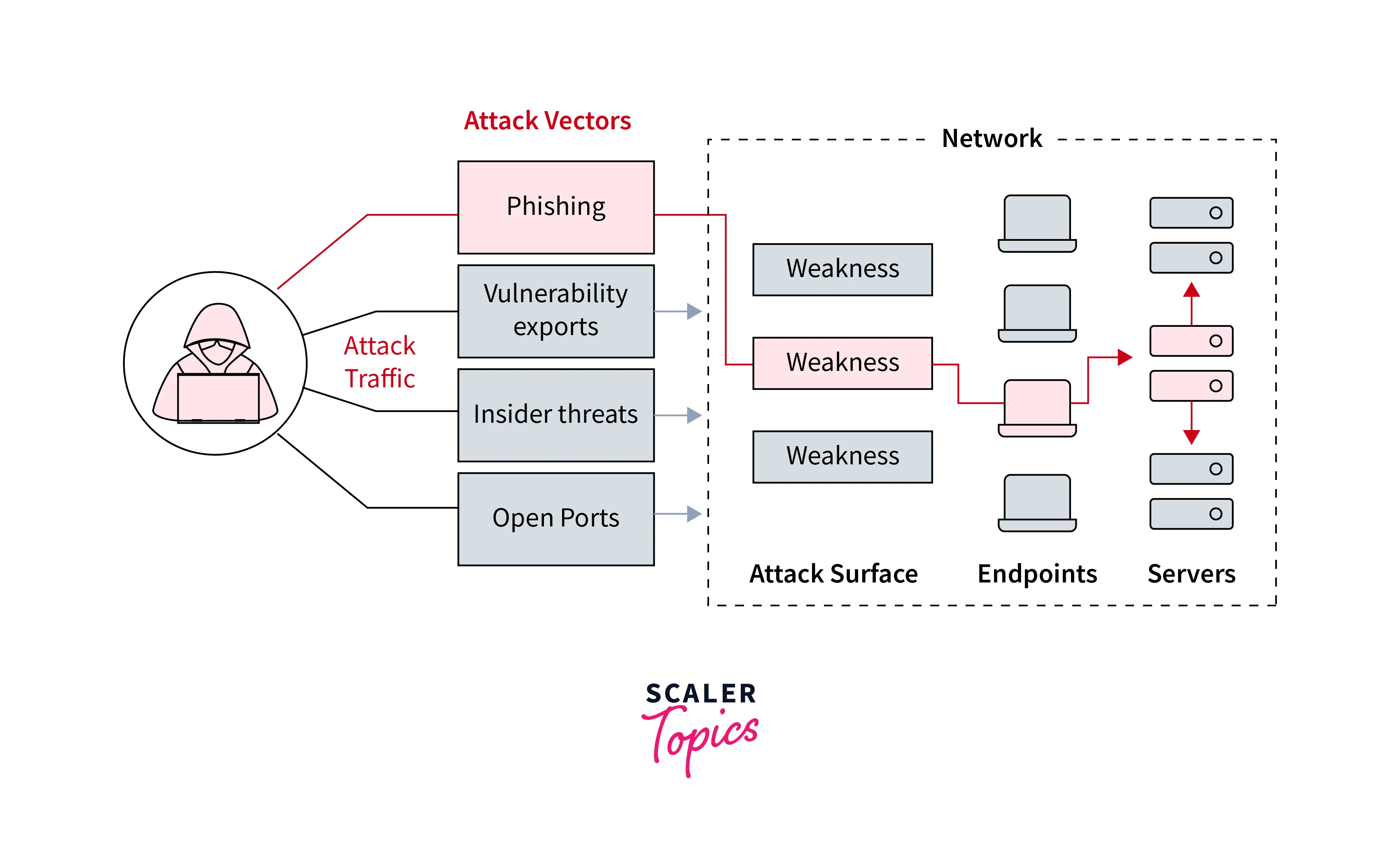
Foundational Concepts
What You Need to Know First
Before diving into threat vectors and attack vectors, it's essential to understand some fundamental concepts related to cybersecurity.
-
Threat: A potential danger or risk that can cause harm to an individual, organization, or system.
-
Vulnerability: A weakness in a system, network, or application that can be exploited by an attacker.
-
Exploit: A piece of code or technique used to take advantage of a vulnerability and gain unauthorized access.
These concepts will serve as the foundation for our discussion on threat vectors and attack vectors.
2. The Intuition
A Real-World Analogy
Imagine you're trying to get into a secure building, but there are multiple entry points (doors, windows, vents). Each entry point has its own set of locks, alarms, and security cameras. An attacker can try to find the easiest way in by exploiting vulnerabilities in one or more of these entry points.
In this analogy, each entry point represents an attack vector, and the locks, alarms, and cameras represent the various security measures designed to prevent unauthorized access.
3. Step-by-Step Breakdown with Examples
The Core Mechanics
Here's a step-by-step guide on how to identify and analyze threat vectors and attack vectors:
-
Identify potential threats: Determine what types of attacks could occur, such as phishing, malware, or social engineering.
-
Analyze vulnerabilities: Identify weaknesses in systems, networks, or applications that can be exploited by attackers.
-
Determine attack vectors: Based on the identified vulnerabilities and potential threats, determine which attack vectors are most likely to be used.
Example:
Suppose you're a security consultant for a company that uses cloud-based services. You identify three potential threats: phishing attacks, malware infections, and social engineering. After analyzing the company's systems and networks, you find two vulnerabilities: an outdated software version and an unpatched firewall rule.
Using this information, you determine the following attack vectors:
-
Phishing attack: Exploit the vulnerability in the outdated software to gain access to employee credentials.
-
Malware infection: Use the unpatched firewall rule to inject malware into the company's network.
-
Social engineering: Trick employees into installing malware or divulging sensitive information.
4. Key Concepts and Formulae
Important Definitions and Tools
Here are some key concepts and formulae related to threat vectors and attack vectors:
-
Attack Vector: A pathway or method used by an attacker to gain unauthorized access to a system, network, or application.
-
Threat Vector: A potential danger or risk that can cause harm to an individual, organization, or system.
5. Applications and Relevance
Real-World Uses
Threat vectors and attack vectors are used in various industries and fields, including:
- Cybersecurity: Identifying and analyzing threat vectors is a critical component of cybersecurity.
- Network Security: Understanding attack vectors helps network administrators design more effective security measures.
- Penetration Testing: Threat vectors and attack vectors are essential for simulating real-world attacks during penetration testing.
6. Common Pitfalls and Considerations
Avoiding Common Mistakes
When analyzing threat vectors and attack vectors, be aware of the following common pitfalls:
- Overlooking human factors: Social engineering attacks often rely on human psychology, so don't underestimate the importance of employee education.
- Focusing too much on technology: While technology is crucial, neglecting human factors can lead to ineffective security measures.
7. The Final Takeaway
Key Takeaway
Threat vectors and attack vectors are interconnected concepts that help you understand how attackers exploit vulnerabilities in systems, networks, or applications. By identifying potential threats, analyzing vulnerabilities, and determining attack vectors, you can develop effective strategies for mitigating risks and improving overall security.
Remember: A strong defense begins with a deep understanding of the various threat vectors and attack vectors that can compromise your organization's security.
Information Assurance
1. Foundational Concepts
What You Need to Know First
Before diving into information assurance, it's essential to understand some fundamental concepts.
-
Data: Information in its most basic form, which can be stored, processed, or transmitted.
-
Information Security: The practice of protecting data from unauthorized access, use, disclosure, modification, or destruction.
-
Risk Management: Identifying and mitigating potential threats to information security.
-
CIA Triad: A widely accepted framework for information security, consisting of:
-
Confidentiality: Protecting data from unauthorized access.
-
Integrity: Ensuring data is accurate, complete, and not modified without authorization.
-
Availability: Ensuring data is accessible when needed.
-
2. The Intuition
Imagine a treasure chest filled with valuable jewels. Information assurance is like securing the chest and its contents to prevent unauthorized access or tampering. Just as you would use locks, alarms, and guards to protect your treasure, information assurance involves implementing measures to safeguard sensitive data.
The Core Mechanics
Information Assurance Model :
The security model is multidimensional model based on four dimensions :
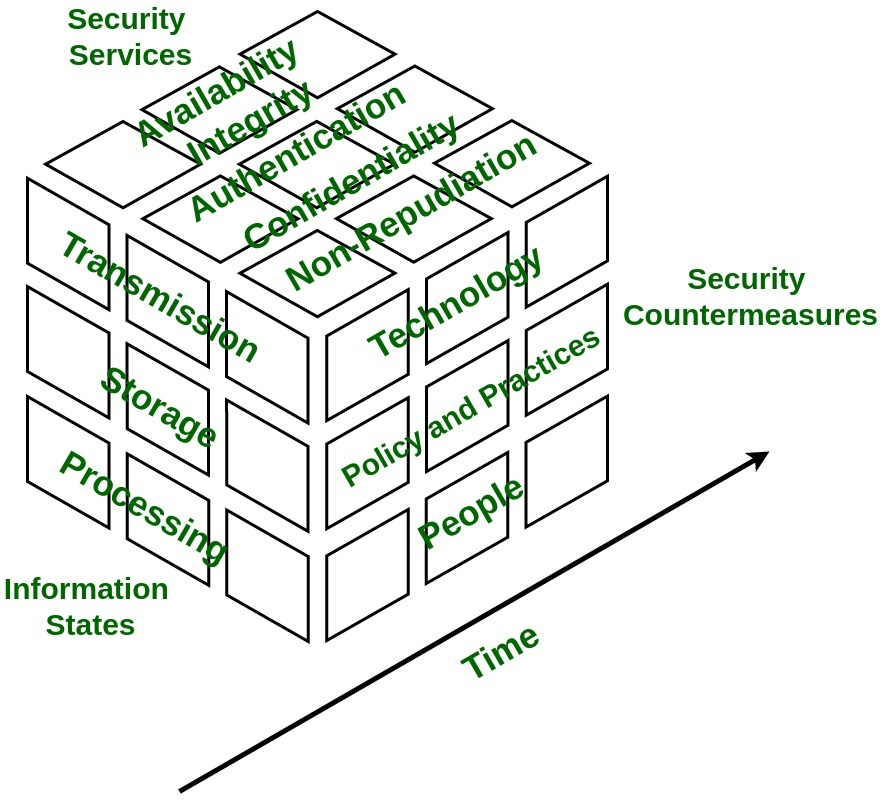
- Information States -
Information is referred to as interpretation of data which can be found in three states: stored, processed, or transmitted. - Security Services -
It is fundamental pillar of the model which provides security to system and consists of five services namely availability, integrity, confidentiality, authentication, and non-repudiation. - Security Countermeasures -
This dimension has functionalities to save system from immediate vulnerability by accounting for technology, policy & practice, and people. - Time -
This dimension can be viewed in many ways. At any given time data may be available offline or online, information and system might be in flux thus, introducing risk of unauthorized access. Therefore, in every phase of System Development Cycle, every aspect of Information Assurance model must be well defined and well implemented in order to minimize risk of unauthorized access.
Types of Information States
Information States :
-
Transmission -
It defines time wherein data is between processing steps.Example :
In transit over networks when user sends email to reader, including memory and storage encountered during delivery. -
Storage -
It defines time during which data is saved on medium such as hard drive. Example: Saving document on file server's disk by user. -
Processing -
It defines time during which data is in processing state.Example :
Data is processed in random access memory (RAM) of workstation.
Security Services
Security Services :
-
Confidentiality -
It assures that information of system is not disclosed to unauthorized access and is read and interpreted only by persons authorized to do so. Protection of confidentiality prevents malicious access and accidental disclosure of information. Information that is considered to be confidential is called as sensitive information.To ensure confidentiality data is categorized into different categories according to damage severity and then accordingly strict measures are taken.
Example :
Protecting email content to read by only desired set of users. This can be insured by data encryption. Two-factor authentication, strong passwords, security tokens, and biometric verification are some popular norms for authentication users to access sensitive data. -
Integrity -
It ensures that sensitive data is accurate and trustworthy and can not be created, changed, or deleted without proper authorization. Maintaining integrity involves modification or destruction of information by unauthorized access.To ensure integrity backups should be planned and implemented in order to restore any affected data in case of security breach. Besides this cryptographic checksum can also be used for verification of data.
Example :
Implementation of measures to verify that e-mail content was not modified in transit. This can be achieved by using cryptography which will ensure that intended user receives correct and accurate information. -
Availability -
It guarantees reliable and constant access to sensitive data only by authorized users. It involves measures to sustain access to data in spite of system failures and sources of interference.To ensure availability of corrupted data must be eliminated, recovery time must be speed up and physical infrastructure must be improved.
Example :
Accessing and throughput of e-mail service. -
Authentication -
It is security service that is designed to establish validity of transmission of message by verification of individual's identity to receive specific category of information.To ensure availability of various single factors and multi-factor authentication methods are used. A single factor authentication method uses single parameter to verify users' identity whereas two-factor authentication uses multiple factors to verify user's identity.
Example :
Entering username and password when we log in to website is example of authentication. Entering correct login information lets website verify our identity and ensures that only we access sensitive information. -
Non-Repudiation -
It is a mechanism to ensure sender or receiver cannot deny the fact that they are part of data transmission. When sender sends data to receiver, it receives delivery confirmation. When receiver receives message it has all information attached within message regarding sender.
Example :
A common example is sending SMS from one mobile phone to another. After message is received confirmation message is displayed that receiver has received message. In return, message received by receiver contains all information about sender.
Security Counter Measures
Security Countermeasures :
- People -
People are heart of information system. Administrators and users of information systems must follow policies and practice for designing good system. They must be informed regularly regarding information system and ready to act appropriately to safeguard system. - Policy & Practice -
Every organization has some set of rules defined in form of policies that must be followed by every individual working in organization. These policies must be practiced in order to properly handle sensitive information whenever system gets compromised. - Technology -
Appropriate technology such as firewalls, routers, and intrusion detection must be used in order to defend system from vulnerabilities, threats. The technology used must facilitate quick response whenever information security gets compromised.
7. The Final Takeaway
Information assurance is a comprehensive approach to safeguarding data and the systems that process it. By understanding the foundational concepts, implementing controls, and continuously monitoring and reviewing, you can ensure the confidentiality, integrity, and availability of your organization's valuable information assets.
Threat Modelling
https://www.geeksforgeeks.org/computer-networks/threat-modelling/
Threat modeling is a structured process for identifying, analyzing, and addressing potential threats to a system, application, or organization. It helps proactively spot vulnerabilities before they are exploited, enabling risk mitigation and improved security. It works to identify, communicate, and understand threats and their mitigations within the context of protecting valuable assets. Threat modeling uses hypothetical scenarios, system diagrams, and testing to secure systems and data.
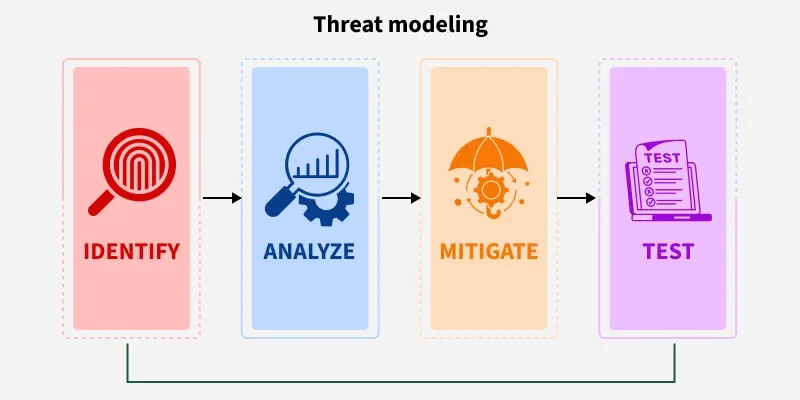
It can be applied to a wide range of targets such as:
- Software and applications
- Systems and networks
- Distributed systems and IoT devices
- Business processes
Purpose of Threat Modeling
The purpose of Threat modeling is to identify, communicate, and understand threats and mitigation to the organization's stakeholders as early as possible. Documentation from this process provides system analysts and defenders with a complete analysis of probable attackers' profiles, the most likely attack vectors, and the assets most desired by the attacker.
Key Components of a Threat Model
- Description of the subject being modeled
- Assumptions that can be validated or challenged over time
- Potential threats relevant to the system or environment
- Mitigation actions for each identified threat
- Validation steps to ensure mitigations are effective
Process of Threat Modeling
This entire process ensures that security is integrated into the design phase and continues throughout the application’s lifecycle
1. Define scope & objectives
Decide exactly what you’re modeling (e.g. only the /login endpoint of a finance app), why it matters (e.g. protecting users' passwords and session tokens), and who owns decisions.
2. Diagram the System
Map out major components, data flows, user interaction points, and trust boundaries. Use a simple DFD or box‑and‑arrows sketch.
Example: Draw: “Mobile App → sends credentials → Auth API → issues session” and note where you cross trust zones (device vs server).
3. Threat Identification
Here we are going to deal with how we can identify threats or what can go wrong in the process. By analyzing the images of the previous section, you have found how threats can be identified. A tool like STRIDE helps cover key categories: spoofing, tampering, disclosure, DoS, etc.
4. Analyze & Prioritize Risks
Estimate likelihood and impact (e.g. credential theft is high impact, but inside job is rare). Use a simple scorecard or scale.
Example: A public Wi-Fi MITM attack is likely/mid-impact; attempt to overwrite tokens is rare/high-impact. Prioritize accordingly
5. Design Mitigations
For top threats, choose a mitigation strategy: fix it, reduce its probability or impact, or accept it. Document owner, cost, and validation plan.
Example: Threat “spoofed device” → mitigation: enforce MFA + device fingerprinting + revoke old sessions.
6. Review & Iterate
Test implemented controls (e.g. try to bypass fingerprinting), update the diagram if the app changes, and repeat periodically.
Enterprise Information Security Architecture
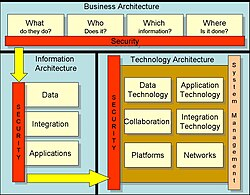
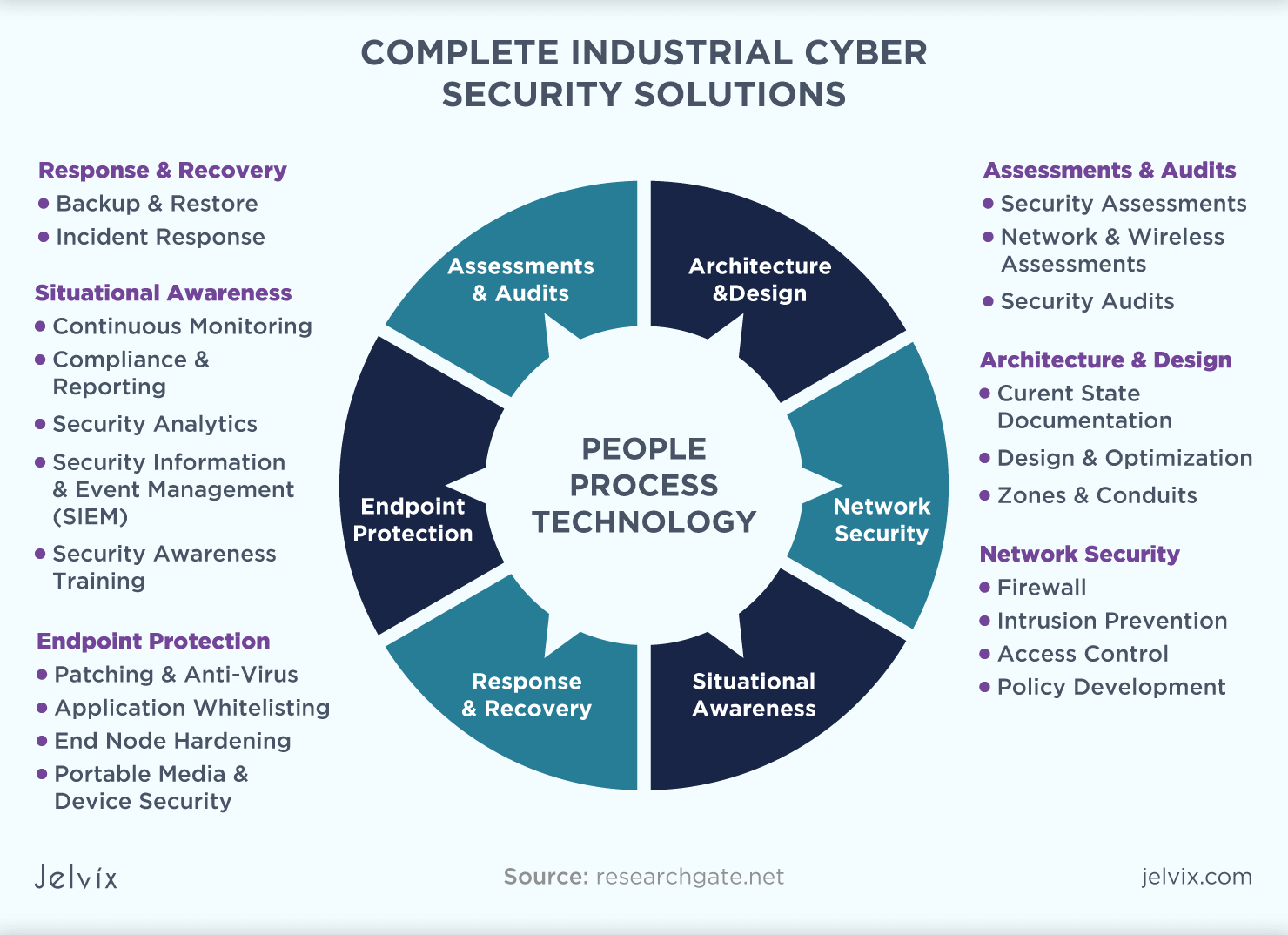
1. Foundational Concepts
What You Need to Know First
Before diving into Enterprise Information Security Architecture (EISA), it's essential to understand some fundamental concepts:
-
Information Security: Protecting sensitive information from unauthorized access, use, disclosure, disruption, modification, or destruction.
-
Enterprise: A large-scale organization with multiple departments, systems, and stakeholders.
-
Architecture: The structure of an organization's IT infrastructure, including hardware, software, networks, and data.
These concepts will serve as the foundation for our discussion on EISA.
2. The Intuition
A Real-World Analogy
Imagine a large, modern city with various districts, each serving a specific purpose (residential, commercial, industrial). Just like how the city's infrastructure is designed to ensure efficient communication and movement between these districts, an Enterprise Information Security Architecture is a deliberate design that connects and secures various information systems within an organization.
This analogy will help us understand how EISA ensures the secure flow of information across different departments, systems, and stakeholders.
3. Step-by-Step Breakdown with Examples
The Core Mechanics
Here's a step-by-step guide to building an Enterprise Information Security Architecture:
-
Identify Business Processes: Map out the organization's core business processes, including data flows, interactions, and dependencies.
-
Assess Risk: Evaluate potential risks and threats to these processes, considering factors like data sensitivity, regulatory compliance, and stakeholder interests.
-
Design Controls: Develop a set of security controls to mitigate identified risks, such as access controls, encryption, firewalls, and incident response plans.
-
Implement Security Measures: Deploy the designed controls across the organization's IT infrastructure, ensuring seamless integration with existing systems.
-
Monitor and Analyze: Continuously monitor the implemented security measures, analyzing logs, and performance data to identify areas for improvement.
Numerical Example:
Suppose we're designing an EISA for a financial institution with multiple branches and online banking services. We identify three core business processes:
- Customer Onboarding
- Transaction Processing
- Reporting and Analytics
We assess the risks associated with each process, considering factors like data sensitivity (customer information), regulatory compliance (FINRA), and stakeholder interests (shareholders).
Risk Assessment:
| Process | Risk Level |
|---|---|
| Customer Onboarding | High |
| Transaction Processing | Medium-High |
| Reporting and Analytics | Low-Medium |
We design controls to mitigate these risks, such as:
- Access controls for customer information
- Encryption for transaction data
- Firewalls for network segmentation
Implementation:
We implement the designed controls across the organization's IT infrastructure, ensuring seamless integration with existing systems.
Monitoring and Analysis:
We continuously monitor the implemented security measures, analyzing logs and performance data to identify areas for improvement.
4. Key Concepts and Formulae
Important Definitions and Tools
- EISA Components: Identify, Assess, Design, Implement, Monitor (IADM)
- Risk Assessment Matrix: A tool used to evaluate risk levels based on likelihood and impact
- Threat Modeling: A process for identifying potential threats and designing controls to mitigate them
5. Applications and Relevance
Real-World Uses
EISA is applied in various industries, including:
- Finance: Protecting customer information and transaction data
- Healthcare: Ensuring confidentiality and integrity of patient records
- Government: Securing sensitive information and protecting national security
6. Common Pitfalls and Considerations
Avoiding Common Mistakes
- Insufficient Risk Assessment: Failing to identify potential risks and threats can lead to security breaches
- Inadequate Control Implementation: Poorly implemented controls can leave vulnerabilities open
- Lack of Continuous Monitoring: Failing to monitor and analyze security measures can lead to complacency and increased risk
7. The Final Takeaway
Key Takeaway
An Enterprise Information Security Architecture is a comprehensive framework for ensuring the security of an organization's IT infrastructure. By following the IADM process, identifying risks, designing controls, implementing security measures, monitoring performance, and continuously improving, organizations can protect their sensitive information and maintain business continuity.
Remember, building a strong EISA requires careful planning, attention to detail, and continuous improvement. By understanding these foundational concepts, you'll be well-equipped to design and implement an effective Enterprise Information Security Architecture for your organization.
Vulnerability Assessment and Penetration Testing
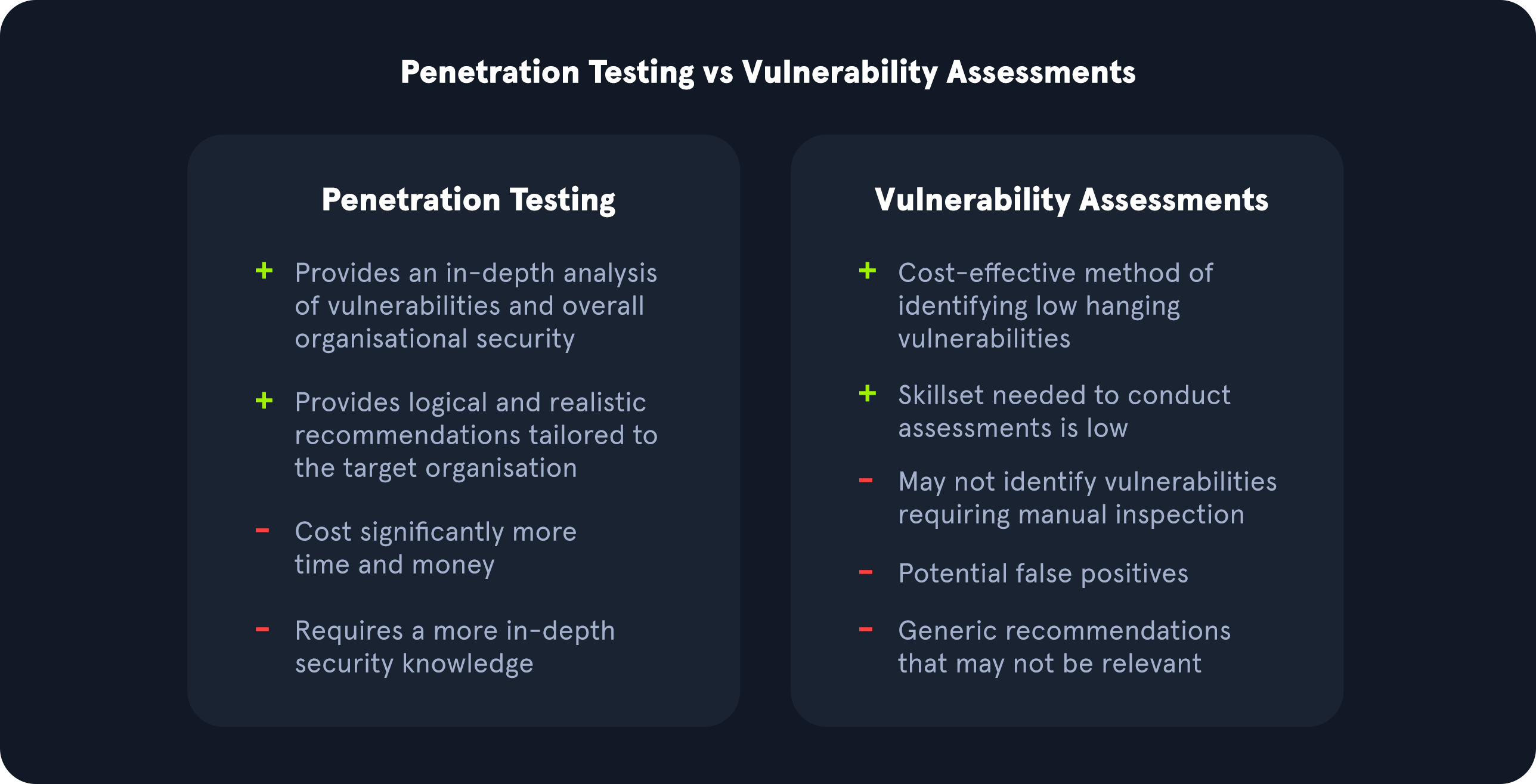
1. Foundational Concepts
What You Need to Know First
Before diving into vulnerability assessment and penetration testing (VAPT), it's essential to understand some fundamental concepts:
-
Network Architecture: A network is a collection of interconnected devices, such as computers, servers, and routers. Understanding how these devices communicate with each other is crucial for VAPT.
-
Communication Protocols: Protocols like TCP/IP, HTTP, and FTP govern how data is transmitted over networks. Familiarity with these protocols will help you understand how vulnerabilities can be exploited.
-
System Components: A system typically consists of hardware (e.g., CPU, memory), software (e.g., operating systems, applications), and network components (e.g., routers, switches). Understanding the relationships between these components is vital for identifying potential vulnerabilities.
2. The Intuition
A Real-World Analogy
Imagine a house with multiple rooms, each containing valuable items. Just as you would want to secure your home by locking doors, installing alarms, and keeping valuables in safe places, organizations need to protect their digital assets from unauthorized access, theft, or damage.
Vulnerability assessment is like conducting a thorough home inspection to identify potential weaknesses (vulnerabilities) that could be exploited by an attacker. Penetration testing simulates the actions of a malicious hacker to test the effectiveness of security measures and identify areas for improvement.
3. Step-by-Step Breakdown with Examples
The Core Mechanics
The VAPT process involves several steps:
- Asset Discovery: Identify all assets (devices, systems, or applications) within the target network.
Example: Scan a network using tools like Nmap to discover devices and their IP addresses.
| Device | IP Address |
|---|---|
| Server 1 | 192.168.1.100 |
| Router 2 | 192.168.1.101 |
| Workstation 3 | 192.168.1.102 |
- Prioritization: Rank assets based on their importance and potential impact if compromised.
Example: Identify critical systems, such as those handling sensitive data or providing essential services.
| Asset | Priority Level |
|---|---|
| Database Server | High |
| File Server | Medium |
| Printer 1 | Low |
- Vulnerability Scanning: Use automated tools to identify potential vulnerabilities in the identified assets.
Example: Run a vulnerability scan using Nessus or OpenVAS on the prioritized assets.
| Asset | Vulnerabilities Found |
|---|---|
| Database Server | Unpatched SQL injection (CVSS 7.5) |
| File Server | Outdated SMBv1 protocol (CVSS 6.8) |
- Result Analysis & Remediation: Analyze the scan results, prioritize remediation efforts, and implement fixes.
Example: Patch the SQL injection vulnerability on the Database Server and update the File Server to use a more secure SMB version.
4. Key Concepts and Formulae
Important Definitions and Tools
-
CVSS (Common Vulnerability Scoring System): A scoring system that evaluates vulnerabilities based on their severity, exploitability, and impact.
-
Vulnerability: A weakness in an asset's design, implementation, or configuration that could be exploited by an attacker.
5. Applications and Relevance
Real-World Uses
VAPT is crucial in various industries:
-
Finance: Protect sensitive financial data from unauthorized access or theft.
-
Healthcare: Ensure the confidentiality, integrity, and availability of patient records and medical devices.
-
Government: Secure critical infrastructure and protect national security information.
6. Common Pitfalls and Considerations
Limitations and Challenges
-
False Positives: Misidentifying legitimate traffic as malicious or vice versa can lead to unnecessary remediation efforts.
-
Resource Constraints: Insufficient resources (e.g., personnel, budget) can hinder the effectiveness of VAPT.
7. The Final Takeaway
Key Takeaway
Vulnerability assessment and penetration testing are essential tools for identifying and addressing potential security weaknesses in digital assets. By understanding the foundational concepts, following a structured approach, and prioritizing remediation efforts, organizations can improve their overall security posture and reduce the risk of successful attacks.
Remember: VAPT is not a one-time event; it's an ongoing process that requires continuous monitoring, testing, and improvement to ensure the security and integrity of digital assets.
Types of Social Engineering
1. Foundational Concepts
What You Need to Know First
Before diving into social engineering, it's essential to understand the basics of human psychology and behavior. Social engineering relies heavily on manipulating people's emotions, biases, and habits to achieve its goals.
Emotional Intelligence: Emotional intelligence (EI) is the ability to recognize and understand emotions in oneself and others. It plays a crucial role in social engineering, as attackers often exploit people's emotional responses to gain trust or manipulate their behavior.(Unfortunately as time is passing, this ability in humans is dwindling, leading to more and more emotionally unintelligent people.)
Cognitive Biases: Cognitive biases are systematic errors in thinking that can lead to incorrect conclusions. Social engineers use these biases to influence people's decisions and actions. Common cognitive biases include confirmation bias, anchoring bias, and availability heuristic.
Psychological Manipulation: Psychological manipulation involves using persuasion, coercion, or deception to control or influence someone's behavior. This is a fundamental concept in social engineering, as attackers often employ manipulative tactics to achieve their goals.
2. The Intuition
A Real-World Analogy
Imagine walking into a coffee shop and being approached by a friendly barista who offers you a free sample of their new coffee blend. They're charming, enthusiastic, and make you feel like you're getting an exclusive deal. You might not even notice that they've asked for your credit card information to "verify" the offer.
This scenario illustrates the power of social engineering. The barista is using psychological manipulation to gain your trust and get what they want (your credit card info). This analogy will help us ground abstract concepts in concrete terms throughout this tutorial.
3. Step-by-Step Breakdown with Examples
The Core Mechanics
Social engineering attacks can be categorized into several types, including:
-
Phishing: Sending fraudulent emails or texts to trick users into revealing sensitive information.
-
Whaling: Targeting high-ranking executives or officials with sophisticated phishing attacks.
-
Baiting: Leaving a malware-infected device or storage media in a public place for someone to find and use.
-
Pretexting: Creating a false scenario or story to gain trust and obtain sensitive information.
Let's break down each type using numerical examples:
Phishing
Example: A fake email from "Amazon" claiming your account has been compromised and asking you to click on a link to reset your password.
Step 1: The attacker sends the email, hoping you'll fall for the scam.
Step 2: You click on the link, which takes you to a fake login page that looks like Amazon's.
Step 3: You enter your credentials, thinking it's a legitimate site. BOOM! Your account is compromised.
Whaling
Example: A sophisticated phishing email targeting a CEO, claiming their company's financial data has been compromised and asking them to click on a link to review the situation.
Step 1: The attacker sends the email, using the CEO's name and company logo.
Step 2: The CEO clicks on the link, which takes them to a fake login page that looks like their company's portal.
Step 3: They enter their credentials, thinking it's a legitimate site. BOOM! Their account is compromised.
Baiting
Example: Leaving a USB drive with malware in a public place, hoping someone will plug it in and infect their device.
Step 1: The attacker leaves the USB drive in a public spot.
Step 2: Someone finds the drive and plugs it into their device.
Step 3: The malware is executed, compromising the device and potentially spreading to other devices on the network.
Pretexting
Example: A social engineer calls you claiming to be from your bank's security department, saying they need to verify some information to prevent a potential fraud.
Step 1: The attacker calls you, using a convincing tone and pretext.
Step 2: You provide the requested information, thinking it's legitimate.
Step 3: The attacker uses that info to commit fraud or steal sensitive data.
4. Key Concepts and Formulae
Important Definitions and Tools
-
Social Engineering: The use of psychological manipulation to trick users into making security mistakes or giving away sensitive information.
-
Phishing: A type of social engineering attack where attackers send fraudulent emails or texts to trick users into revealing sensitive information.
5. Applications and Relevance
Real-World Uses
Social engineering is used in various industries, including:
- Finance: To commit fraud or steal sensitive financial data.
- Healthcare: To access patient records or compromise medical devices.
- Technology: To gain unauthorized access to systems or networks.
- Law Enforcement: To gather intelligence or catch criminals.
6. Common Pitfalls and Considerations
Limitations and Misconceptions
Common pitfalls in social engineering include:
- Overconfidence: Believing that you're immune to social engineering attacks because you're tech-savvy or experienced.
- Lack of Awareness: Not understanding the tactics and techniques used by attackers, making it harder to detect and prevent attacks.
7. The Final Takeaway
Key Concept Summary
Social engineering is a powerful attack vector that relies on psychological manipulation to trick users into making security mistakes or giving away sensitive information. By understanding the different types of social engineering attacks, recognizing common pitfalls, and developing emotional intelligence, you can better protect yourself and others from these threats.
Remember: Awareness is key!
Insider Attack
1. Foundational Concepts
What You Need to Know First
Before diving into insider attacks, it's essential to understand the basics of cybersecurity and threat analysis.
-
What is a Threat?: A threat is any potential danger or harm that can be caused to an organization's assets, such as data, systems, or personnel.
-
Threat Actors: These are individuals or groups that carry out malicious activities, including insider attacks.
-
Vulnerabilities: Weaknesses in an organization's defenses or systems that can be exploited by threat actors.
2. The Intuition
A Real-World Analogy
Imagine a company where employees have access to sensitive information and systems. An insider attack is like a "Trojan Horse" scenario, where an attacker gains trust and access to the system, allowing them to carry out malicious activities undetected.
This analogy will help us understand how insider attacks work and why they're so challenging to detect.
3. Step-by-Step Breakdown with Examples
The Core Mechanics
An insider attack typically involves several steps:
-
Gaining Trust: The attacker establishes a relationship with the organization, gaining trust and access to sensitive information.
-
Identifying Vulnerabilities: The attacker identifies weaknesses in the organization's defenses or systems that can be exploited.
-
Exploiting Vulnerabilities: The attacker uses the identified vulnerabilities to gain unauthorized access or control over the system.
-
Carrying Out Malicious Activities: The attacker carries out malicious activities, such as data theft, system disruption, or financial fraud.
Let's work through an example:
Suppose an employee at a bank has access to sensitive customer information and systems. They become disgruntled with their job and decide to steal customer data for personal gain.
Step 1: Gaining Trust: The employee builds trust with colleagues by being friendly and helpful, gaining access to sensitive areas and systems.
Step 2: Identifying Vulnerabilities: The employee identifies a vulnerability in the bank's system that allows them to access customer information without authorization.
Step 3: Exploiting Vulnerabilities: The employee uses the identified vulnerability to gain unauthorized access to customer data.
Step 4: Carrying Out Malicious Activities: The employee steals customer data and sells it on the dark web, causing financial losses for the bank and compromising customer trust.
4. Key Concepts and Formulae
Important Definitions and Tools
- Insider Threat: A threat that originates from within an organization, often carried out by a current or former employee, contractor, or other authorized individual.
- Vulnerability: A weakness in an organization's defenses or systems that can be exploited by an attacker.
5. Applications and Relevance
Real-World Uses
Insider attacks are used in various industries, including:
- Finance: Insider attacks are often used to steal sensitive financial information or disrupt trading activities.
- Healthcare: Insider attacks can compromise patient data or disrupt medical services.
- Government: Insider attacks can be used to steal classified information or disrupt critical infrastructure.
6. Common Pitfalls and Considerations
Limitations and Challenges
Common pitfalls when dealing with insider attacks include:
-
Lack of Visibility: Insiders often have legitimate access to systems, making it challenging to detect their malicious activities.
-
Difficulty in Detection: Insider attacks can be difficult to detect due to the lack of obvious signs or indicators.
-
Human Factor: Insider attacks often involve human psychology and social engineering tactics, making them more challenging to prevent.
7. The Final Takeaway
Key Takeaway
Insider attacks are a significant threat to organizations, requiring a comprehensive approach that includes:
-
Employee Screening: Conduct thorough background checks and monitor employee behavior.
-
Access Control: Implement robust access controls and monitoring systems.
-
Vulnerability Management: Identify and remediate vulnerabilities in systems and networks.
By understanding the mechanics of insider attacks and implementing effective countermeasures, organizations can better protect themselves against these threats.
Preventing Insider Threats
1. Foundational Concepts
What You Need to Know First
Before diving into preventing insider threats, it's essential to understand what an insider threat is and why it's crucial to prevent them.
An insider threat refers to a cybersecurity risk that originates from within the organization. This can include employees, contractors, or even former employees who have access to sensitive information or systems. Insider threats can be intentional (e.g., espionage) or unintentional (e.g., careless mistakes).
To effectively prevent insider threats, we need to understand the motivations and behaviors of potential insiders. This includes factors like job satisfaction, financial stress, and personal relationships.
Key Terms
-
Insider: A person with authorized access to an organization's systems, data, or facilities.
-
Motivation: The reason behind an individual's actions, which can be driven by various factors (e.g., financial gain, revenge, curiosity).
-
Behavior: The actions taken by an individual, which can be influenced by their motivation and circumstances.
2. The Intuition
A Real-World Analogy
Imagine a castle with multiple layers of security. Each layer represents a different level of access control, from the outer moat to the innermost sanctum. Just as you wouldn't leave the main gate unlocked, an organization shouldn't leave its digital gates open to insider threats.
Think of preventing insider threats like building a sturdy wall around your castle. You need to:
- Identify potential weaknesses (e.g., employee dissatisfaction).
- Implement controls to mitigate those risks (e.g., regular security awareness training).
- Monitor and respond to suspicious behavior (e.g., unusual login attempts).
By understanding the motivations and behaviors of potential insiders, you can build a more effective wall around your organization's digital assets.
3. Step-by-Step Breakdown with Examples
The Core Mechanics
Preventing insider threats involves a combination of people, processes, and technology. Here's a step-by-step guide to help you get started:
- Conduct Regular Security Awareness Training:
- Example: Schedule biannual training sessions for all employees, covering topics like password management, phishing, and data protection.
- Tip: Make training interactive and engaging to keep employees focused.
| Step | Description |
|---|---|
| 1 | Conduct regular security awareness training |
| 2 | Implement Employee Monitoring |
| 3 | Set Up User & Entity Behavior Analytics (UEBA) |
| 4 | Use Insider Threat Detection Solutions |
Numerical Example: Security Awareness Training
Suppose you have a team of 50 employees. You decide to conduct biannual security awareness training sessions, with each session lasting 2 hours.
Calculating Training Time: 50 employees × 2 hours per session = 100 hours of training time per year
Training Frequency: Biannual (twice a year)
Formula: Employee Monitoring
Let's say you want to monitor employee activity for 30 days. You need to:
- Calculate the total number of employee interactions (e.g., login attempts, file access) during that period.
- Identify unusual patterns or suspicious behavior.
Formula: Total Interactions = (Employee Count × Average Daily Interactions) × Monitoring Period
Example: Total Interactions = (50 employees × 10 interactions/day) × 30 days = 15,000 interactions
Formula: UEBA
Suppose you want to detect insider threats using UEBA. You need to:
- Calculate the average user behavior score for each employee.
- Identify users with unusual behavior scores.
Formula: Behavior Score = (Average Daily Interactions) × (User Entity Risk Factor)
Example: Behavior Score = (10 interactions/day) × (0.5 risk factor) = 5
4. Key Concepts and Formulae
Important Definitions and Tools
- Insider Threat Detection: The process of identifying and responding to insider threats.
- UEBA: User Entity Behavior Analytics, which analyzes user behavior to detect anomalies.
Formula: Insider Threat Score = (Behavior Score) × (Motivation Factor)
Example: Insider Threat Score = (5) × (0.8 motivation factor) = 4
5. Applications and Relevance
Real-World Uses
Preventing insider threats is crucial in various industries, including:
-
Finance: Protect sensitive financial data from unauthorized access.
-
Healthcare: Prevent patient data breaches and maintain confidentiality.
-
Government: Secure classified information and prevent espionage.
6. Common Pitfalls and Considerations
Avoiding Insider Threats
Common pitfalls when preventing insider threats include:
-
Insufficient Training: Failing to provide regular security awareness training for employees.
-
Lack of Monitoring: Not implementing employee monitoring or UEBA solutions.
-
Inadequate Response: Failing to respond promptly to suspicious behavior.
7. The Final Takeaway
Key Takeaway
To effectively prevent insider threats, you need to:
-
Understand the motivations and behaviors of potential insiders.
-
Implement controls like regular security awareness training and employee monitoring.
-
Monitor and respond to suspicious behavior using UEBA solutions.
By following these steps, you can build a sturdy wall around your organization's digital assets and prevent insider threats from compromising sensitive information.
Social Engineering Targets and Defense Strategies
1. Foundational Concepts
What You Need to Know First
Before diving into social engineering targets and defense strategies, let's establish some foundational concepts.
What is Social Engineering?
Social engineering is a type of cyberattack that relies on human interaction and emotions to manipulate individuals into divulging sensitive information or performing certain actions. This attack vector exploits the psychological vulnerabilities of humans rather than relying solely on technical vulnerabilities in systems.
Types of Social Engineering Attacks
-
Phishing: Attackers send fraudulent emails or messages that appear to be from a legitimate source, aiming to trick victims into revealing sensitive information like passwords or financial data.
-
Pretexting: Attackers create a false narrative or backstory to gain the trust of their target, often using this trust to extract sensitive information or perform malicious actions.
-
Baiting: Attackers leave a seemingly innocuous device or media (e.g., USB drive) in a public place, hoping someone will plug it in and install malware or steal data.
Why Social Engineering is Effective
Social engineering attacks are often successful because they:
-
Exploit Human Psychology: Humans are wired to respond to emotional cues, making them more susceptible to manipulation.
-
Leverage Familiarity: Attackers use familiar names, logos, and scenarios to create a sense of trust with their targets.
-
Play on Urgency: Attackers often create a sense of urgency or scarcity to prompt victims into taking action without fully thinking it through.
2. The Intuition
A Real-World Analogy
Imagine you're at a coffee shop, and someone approaches you, claiming they lost their phone and need to borrow yours to make an urgent call. They seem genuinely apologetic and stressed, making you feel sympathetic towards them. As you hand over your phone, they quickly glance at the screen, take a few photos, and return it with a smile, saying everything is fine now.
This scenario illustrates the power of social engineering: the attacker manipulated your emotions (empathy) to gain control of your device, exploiting your trust in the situation. This analogy will serve as a foundation for understanding social engineering targets and defense strategies.
3. Step-by-Step Breakdown with Examples
The Core Mechanics
To defend against social engineering attacks, it's essential to understand the attacker's thought process and tactics. Here's a step-by-step guide:
-
Initial Contact: Attackers often initiate contact through email, phone, or in-person interactions.
- Example: A phishing email claiming your bank account has been compromised and you need to reset your password immediately.
-
Building Trust: Attackers create a false narrative or backstory to gain the trust of their target.
- Example: The attacker claims they're from a reputable company and are calling about an urgent issue with your account.
-
Creating Urgency: Attackers often create a sense of urgency or scarcity to prompt victims into taking action without fully thinking it through.
- Example: The attacker says there's a limited-time offer or that your account will be suspended if you don't take immediate action.
-
Gaining Control: Attackers aim to gain control over the target's device, data, or actions.
- Example: The attacker asks you to install software or provide sensitive information to "fix" the issue with your account.
-
Covering Tracks: Attackers often cover their tracks by deleting logs, using encryption, or creating fake identities.
- Example: The attacker wipes their digital footprints clean after completing the attack.
Numerical Examples
Let's work through an example of a phishing email:
Email Body
Subject: Urgent: Your Bank Account Has Been Compromised!

Dear [User],

We've detected suspicious activity on your bank account. To prevent any further issues, please reset your password immediately by clicking this link: [Malicious Link]

Best regards,
[Bank Representative]
Step-by-Step Analysis
-
Initial Contact: The email initiates contact with a sense of urgency.
-
Building Trust: The email claims to be from the user's bank and creates a false narrative about account compromise.
-
Creating Urgency: The email emphasizes the need for immediate action to prevent further issues.
-
Gaining Control: The email prompts the user to reset their password, which could grant access to sensitive information.
4. Key Concepts and Formulae
Important Definitions and Tools
-
Social Engineering: A type of cyberattack that relies on human interaction and emotions to manipulate individuals into divulging sensitive information or performing certain actions.
-
Phishing: A specific type of social engineering attack where attackers send fraudulent emails or messages to trick victims into revealing sensitive information.
5. Applications and Relevance
Real-World Uses
Social engineering is used in various industries, including:
-
Finance: Attackers target financial institutions to steal funds or gain access to sensitive information.
-
Healthcare: Attackers aim to compromise patient data or disrupt medical services.
-
Government: Attackers target government agencies to steal classified information or disrupt critical infrastructure.
6. Common Pitfalls and Considerations
Key Takeaways
-
Don't Assume: Don't assume that a social engineering attack is not possible just because you're aware of its tactics.
-
Verify Information: Always verify the authenticity of information before taking action, especially when dealing with sensitive data or systems.
-
Employee Training: Provide regular employee training and awareness programs to educate staff on social engineering tactics and defense strategies.
7. The Final Takeaway
Key Takeaway
Social engineering is a powerful attack vector that can be used by attackers to compromise even the most secure systems. To defend against these attacks, it's essential to understand the attacker's thought process and tactics, as well as to provide regular employee training and awareness programs. By being aware of social engineering tactics and taking proactive measures, you can significantly reduce the risk of successful attacks.