Module 4 -- Cyber Forensics and Auditing
Index
- Introduction to Cyber Forensics
- Computer Equipment and associated storage media
- Role of forensics Investigator
- Forensics Investigation Process
- Collecting Network based Evidence
- Writing Computer Forensics reports
- Auditing in Cyber Security
- Planning a cyber security audit against a set of audit criteria
- Information Security Management System
- Introduction to ISO 27001 2013
- ISO 27001 2013 — Additional Exam-Essential Sections
Introduction to Cyber Forensics
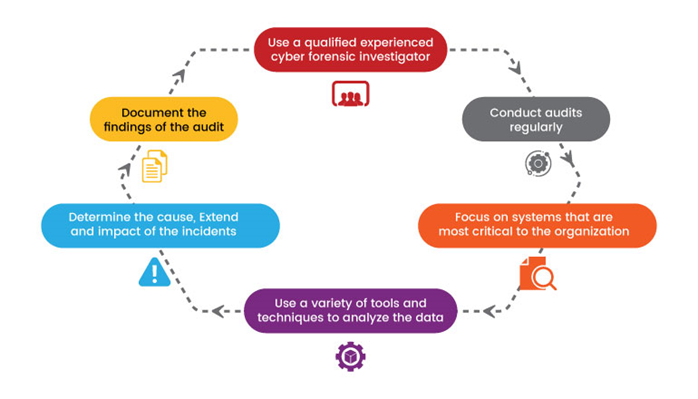
1. Foundational Concepts
What You Need to Know First
Before diving into cyber forensics and auditing, it's essential to understand some fundamental concepts.
-
Digital Evidence: Digital evidence refers to any electronically stored information that can be used as proof in a legal or administrative proceeding.
-
Chain of Custody: The chain of custody is the process of tracking and documenting digital evidence from its collection to its presentation in court. This ensures the integrity and admissibility of the evidence.
-
Hashing: Hashing is a one-way mathematical function that takes input data and generates a fixed-length string, known as a hash value or message digest. Hash values are used to verify the integrity of digital evidence.
2. The Intuition
A Real-World Analogy
Imagine you're trying to solve a mystery by analyzing clues left at a crime scene. Cyber forensics and auditing is similar, but instead of physical evidence, we deal with digital clues, such as network traffic logs, system files, and user activity records.
Think of cyber forensics as collecting and analyzing digital "clues" from computer systems, networks, or devices to answer questions like:
- What happened?
- Who was involved?
- When did it happen?
- How did it happen?
Auditing is the process of reviewing and verifying the integrity of these digital clues to ensure they're accurate and reliable.
3. Step-by-Step Breakdown with Examples
The Core Mechanics
The cyber forensic process involves the following steps:
Here's a step-by-step guide to cyber forensics and auditing:
-
Preservation: Immediately preserve the digital evidence by creating a bit-for-bit copy of the original data.
- Example: You're investigating a malware outbreak on a company's network. You create a forensic image of the affected server to analyze later.
-
Identification: Identify the type of digital evidence and its relevance to the investigation.
- Example: During the malware investigation, you identify a suspicious file as a potential malware sample.
-
Collection: Collect relevant digital evidence from various sources, such as devices, networks, or cloud storage.
- Example: You collect network logs, system logs, and user accounts data to analyze the malware's behavior.
-
Analysis: Analyze the collected digital evidence using specialized tools and techniques.
- Example: You use a malware analysis tool to reverse-engineer the suspicious file and understand its functionality.
-
Interpretation: Interpret the results of your analysis to draw conclusions about what happened.
- Example: Based on your analysis, you conclude that the malware was used to steal sensitive data from the company's network.
-
Reporting: Document your findings in a clear and concise report.
- Example: You create a comprehensive report detailing the investigation's results, including the malware's characteristics, its impact on the network, and recommendations for remediation.
Example:
Suppose we're investigating a suspected malware attack on a company's network. We start by preserving the affected systems and collecting logs from the network devices.
| Step | Description |
|---|---|
| 1. Preservation | Create a bit-for-bit copy of the affected systems' data. |
| 2. Examination | Review system logs to identify potential malware activity. |
| 3. Analysis | Analyze the logs to determine the scope and impact of the attack. |
| 4. Reporting | Document the findings in a comprehensive report, including recommendations for remediation. |
4. Key Concepts and Formulae
Important Definitions and Tools
-
Digital Forensic Tool: A digital forensic tool is software designed to aid in the analysis and preservation of digital evidence.
-
Forensic Image: A bit-for-bit copy of a device's original data, created for analysis purposes.
-
Hashing Algorithm: A hashing algorithm is a mathematical function used to generate hash values, which can be used to verify the integrity of digital evidence.
Example:
Suppose we're using the SHA-256 hashing algorithm to verify the integrity of a file. We calculate the hash value for the original file and compare it to the hash value generated from the preserved copy.
SHA-256(original_file) = 0x1234567890abcdef
SHA-256(preserved_copy) = 0x1234567890abcdef
If the two hash values match, we can conclude that the preserved copy is identical to the original file.
5. Applications and Relevance
Real-World Uses
Cyber forensics and auditing are used in various industries and fields, including:
- Law enforcement: To investigate cybercrimes and gather evidence for prosecution.
- Financial institutions: To detect and prevent fraudulent activities.
- Healthcare: To ensure the security and integrity of patient data.
6. Common Pitfalls and Considerations
Potential Errors
Some common pitfalls to avoid when conducting cyber forensics and auditing include:
- Chain of Custody: Failing to maintain a proper chain of custody can compromise the admissibility of evidence.
- Preservation: Failing to preserve digital evidence in its original form can result in lost or corrupted data.
- Data Contamination: Avoiding accidental changes or modifications to the digital evidence.
- Lack of Expertise: Ensuring that investigators have the necessary skills and knowledge for effective analysis.
7. The Final Takeaway
Key Takeaway
Cyber forensics and auditing is a critical process for investigating and resolving cyber incidents. By understanding the foundational concepts, following the step-by-step process, and avoiding common pitfalls, you'll be well-equipped to tackle complex cybersecurity challenges.
Computer Equipment and associated storage media
1. Foundational Concepts
What You Need to Know First
Before diving into computer equipment and associated storage media in cyber forensics and auditing, it's essential to understand some fundamental concepts.
-
Computer Forensic Analysis: This process involves analyzing digital evidence from various sources, such as computers, networks, and storage devices. The goal is to identify, extract, and analyze relevant data to reconstruct events or incidents.
-
Digital Evidence: Any data that can be used as proof in a legal proceeding is considered digital evidence. This includes files, emails, chat logs, system logs, and other digital artifacts.
-
Storage Media: Storage media refers to devices or systems that store digital information. Examples include hard drives, solid-state drives (SSDs), USB flash drives, CDs, DVDs, and external storage devices.
2. The Intuition
A Real-World Analogy
Imagine a crime scene investigator collecting physical evidence from a burglary site. They gather fingerprints, DNA samples, and other tangible items to help solve the case. Similarly, in cyber forensics, we collect digital evidence from computer equipment and storage media to reconstruct events or incidents.
3. Step-by-Step Breakdown with Examples
The Core Mechanics
The process of analyzing computer equipment and associated storage media involves several steps:
-
Identification: Identify the type of device or storage medium involved in the investigation.
-
Acquisition: Acquire a copy of the data from the device or storage medium using specialized tools and techniques.
-
Examination: Examine the acquired data to identify relevant digital evidence, such as files, emails, or system logs.
-
Analysis: Analyze the identified digital evidence to reconstruct events or incidents.
-
Reporting: Document the findings and present them in a clear and concise report.
Numerical Example:
Suppose we're investigating a cyber attack on a company's network. We've acquired a copy of the attacker's USB drive, which contains several files and folders. Our task is to examine the contents of the USB drive and identify any relevant digital evidence.
| File/Folder | Contents |
|---|---|
| folder1 | 10 text files, 2 executable files |
| folder2 | 5 image files, 3 video files |
| file1.txt | Malware code |
We can use specialized tools to analyze the contents of the USB drive and identify relevant digital evidence. For example, we might use a hex editor to examine the contents of file1.txt and determine that it contains malware code.
4. Key Concepts and Formulae
Important Definitions and Tools
- Hash Values: A unique digital fingerprint generated by a hashing algorithm (e.g., MD5, SHA-256) used to verify data integrity.
- Digital Forensic Tools: Specialized software and hardware used for digital evidence acquisition, analysis, and reporting.
5. Applications and Relevance
Real-World Uses
Cyber forensics plays a crucial role in various industries, including:
- Law enforcement: Investigating cybercrimes and gathering evidence to prosecute offenders.
- Corporate security: Identifying and responding to cybersecurity threats, such as data breaches or malware attacks.
- Healthcare: Analyzing patient data and medical records to ensure confidentiality and integrity.
6. Common Pitfalls and Considerations
Avoiding Mistakes
Some common pitfalls in cyber forensics include:
- Data Contamination: Accidentally altering or destroying digital evidence during the investigation process.
- Inadequate Documentation: Failing to properly document findings, methods, and results, which can compromise the integrity of the investigation.
7. The Final Takeaway
Key Takeaway
The key takeaway from this tutorial is that computer equipment and associated storage media are critical components in cyber forensics and auditing. By understanding the steps involved in analyzing these devices and storage media, you'll be better equipped to identify, extract, and analyze relevant digital evidence to reconstruct events or incidents.
Role of forensics Investigator
1. Foundational Concepts
What You Need to Know First
Before diving into the role of a forensic investigator, it's essential to understand the basics of digital forensics and auditing.
-
Digital Forensics: The process of collecting, preserving, and analyzing digital evidence from various sources, such as computers, networks, or mobile devices.
-
Auditing: The examination and evaluation of an organization's systems, processes, and controls to ensure they are operating effectively and efficiently.
These concepts will serve as the foundation for understanding the role of a forensic investigator.
2. The Intuition
A Real-World Analogy
Imagine a crime scene where a valuable piece of jewelry has been stolen. Law enforcement officers need to gather evidence, analyze it, and reconstruct the events surrounding the theft to catch the perpetrator. This process is similar to what a forensic investigator does in the digital realm.
A forensic investigator collects digital evidence from various sources, analyzes it, and uses their findings to help solve crimes or identify vulnerabilities in an organization's systems.
3. Step-by-Step Breakdown with Examples
The Core Mechanics
The role of a forensic investigator can be broken down into several steps:
-
Evidence Collection: Gather digital evidence from various sources, such as computers, networks, or mobile devices.
- Example: Collecting a suspect's phone and analyzing its contents to find incriminating messages.
-
Preservation: Ensure the integrity of the evidence by preserving it in a controlled environment.
- Example: Placing a seized computer into a sealed container to prevent tampering.
-
Analysis: Examine the collected evidence using specialized tools and techniques.
- Example: Using digital forensics software to analyze a suspect's email account and find suspicious activity.
-
Reporting: Compile the findings from the analysis into a comprehensive report that can be used as evidence in court or for organizational purposes.
- Example: Creating a detailed report of the digital evidence collected, including timestamps, IP addresses, and file contents.
Techniques that cyber forensic investigators use
Cyber forensic investigators use various techniques and tools to examine the data and some of the commonly used techniques are:
-
Reverse steganography: Steganography is a method of hiding important data inside the digital file, image, etc. So, cyber forensic experts do reverse steganography to analyze the data and find a relation with the case.
-
Stochastic forensics: In Stochastic forensics, the experts analyze and reconstruct digital activity without using digital artifacts. Here, artifacts mean unintended alterations of data that occur from digital processes.
-
Cross-drive analysis: In this process, the information found on multiple computer drives is correlated and cross-references to analyze and preserve information that is relevant to the investigation.
-
Live analysis: In this technique, the computer of criminals is analyzed from within the OS in running mode. It aims at the volatile data of RAM to get some valuable information.
-
Deleted file recovery: This includes searching for memory to find fragments of a partially deleted file in order to recover it for evidence purposes.
4. Key Concepts and Formulae
Important Definitions and Tools
Some key concepts to understand when it comes to forensic investigators include:
-
Digital Evidence: Any data or information that can be used as evidence in a legal proceeding.
-
Chain of Custody: The documentation and tracking of the movement of digital evidence from collection to analysis to reporting.
5. Applications and Relevance
Real-World Uses
Forensic investigators play a critical role in various industries and fields, including:
-
Law Enforcement: Forensic investigators help solve crimes by analyzing digital evidence.
-
Cybersecurity: Forensic investigators identify vulnerabilities and develop strategies to prevent future attacks.
-
Organizational Auditing: Forensic investigators evaluate an organization's systems and processes to ensure compliance with regulations.
6. Common Pitfalls and Considerations
Avoiding Missteps
Some common pitfalls to avoid when working with forensic investigators include:
-
Lack of Training: Forensic investigators require specialized training to ensure the integrity of digital evidence.
-
Inadequate Documentation: Failing to properly document the chain of custody or analysis can compromise the validity of the evidence.
7. The Final Takeaway
Key Takeaway
The role of a forensic investigator is to collect, preserve, and analyze digital evidence to help solve crimes, identify vulnerabilities, or evaluate organizational systems. By understanding the foundational concepts, core mechanics, key concepts, applications, and common pitfalls, you'll be well-equipped to navigate the world of forensic investigation.
References:
- [1] Splunk. (n.d.). Forensic Investigator Role. Retrieved from https://www.splunk.com/en_us/blog/learn/forensic-investigator-role.html
- [2] Forensics Colleges. (n.d.). The Role of a Forensic Investigator. Retrieved from https://www.forensicscolleges.com/career-advice/forensic-investigator
- [3] Indeed. (n.d.). What Does a Forensic Investigator Do? Retrieved from https://ca.indeed.com/career-advice/finding-a-job/what-does-forensic-investigator-do
Forensics Investigation Process
What You Need to Know First
Before diving into the forensics investigation process, it's essential to understand some fundamental concepts:
-
Digital Evidence: Refers to any data or information stored electronically, such as files, emails, chat logs, and other digital artifacts.
-
Chain of Custody: The process of tracking and documenting the movement of evidence from its initial collection to its final analysis, ensuring that it remains untainted and authentic.
-
Preservation: The act of maintaining the integrity and authenticity of digital evidence by minimizing any potential changes or alterations.
A Real-World Analogy
Imagine a crime scene where a valuable item has been stolen. Forensic investigators would collect physical evidence like fingerprints, DNA samples, and security footage to reconstruct what happened. In a similar manner, cyber forensics investigators collect and analyze digital evidence to piece together the events surrounding a cybercrime.
The Core Mechanics
The forensics investigation process can be broken down into six stages:
-
Identification: Identify the scope of the incident, determine the type of attack or breach, and identify the affected systems or data.
-
Preservation: Preserve the digital evidence by creating a bit-for-bit copy of the original data, minimizing any potential changes or alterations.
-
Analysis: Analyze the preserved digital evidence to extract relevant information, such as network logs, system configurations, and user activity.
-
Examination: Examine the analyzed data to identify patterns, anomalies, and potential indicators of compromise (IOCs).
-
Documentation: Document all findings, including the scope of the incident, the methods used for preservation and analysis, and any conclusions drawn from the examination.
-
Presentation: Present the results of the investigation in a clear and concise manner, providing recommendations for remediation and future prevention.
Step-by-Step Breakdown with Examples
Let's walk through an example to illustrate each stage:
Identification
Suppose we're investigating a suspected phishing attack on a company's email system. We identify the scope of the incident as a compromised employee account and determine that the attack was likely carried out using a phishing email.
Preservation
We create a bit-for-bit copy of the affected email server, ensuring that all data is preserved for further analysis. This includes emails, attachments, and system logs.
Analysis
We analyze the preserved data to extract relevant information, such as:
- Network logs showing unusual login activity
- System configuration files indicating potential malware installation
- User activity logs revealing suspicious behavior
Examination
We examine the analyzed data to identify patterns and anomalies. For example:
- We notice a spike in login attempts from an unfamiliar IP address
- We find a suspicious executable file with unknown origins
- We identify a series of unusual email attachments sent from the compromised account
Documentation
We document all findings, including:
- The scope of the incident: compromised employee account and suspected phishing attack
- Methods used for preservation and analysis: bit-for-bit copy creation and network log analysis
- Conclusions drawn from the examination: likely phishing attack with potential malware installation
Presentation
We present the results in a clear and concise manner, providing recommendations for remediation and future prevention. For example:
- Remediate the compromised account by resetting passwords and implementing additional security measures
- Implement email filtering and monitoring to detect similar attacks in the future
- Provide employee training on phishing awareness and best practices
Key Concepts and Formulae
Important definitions and tools include:
- Digital Evidence: Any data or information stored electronically, such as files, emails, chat logs, and other digital artifacts.
- Chain of Custody: The process of tracking and documenting the movement of evidence from its initial collection to its final analysis, ensuring that it remains untainted and authentic.
- Preservation: The act of maintaining the integrity and authenticity of digital evidence by minimizing any potential changes or alterations.
Applications and Relevance
Cyber forensics investigations are crucial in various industries and fields, such as:
- Law enforcement: Investigating cybercrimes like hacking, identity theft, and online fraud
- Corporate security: Identifying and responding to internal threats, data breaches, and intellectual property theft
- Healthcare: Tracing the source of malware infections and identifying vulnerabilities in medical devices
Common Pitfalls and Considerations
Common misunderstandings and limitations include:
-
Lack of expertise: Insufficient training or experience in cyber forensics can lead to incorrect conclusions or missed evidence.
-
Data quality issues: Poor data preservation, incomplete documentation, or inadequate analysis can compromise the integrity of the investigation.
-
Resource constraints: Limited resources, such as personnel, equipment, and budget, can hinder the effectiveness of the investigation.
The Final Takeaway
The forensics investigation process is a critical step in identifying, containing, and responding to cybercrimes. By following the stages outlined above, investigators can ensure that digital evidence is preserved, analyzed, and presented effectively, ultimately helping to bring perpetrators to justice and prevent future attacks.
Collecting Network based Evidence
1. Foundational Concepts
What You Need to Know First
Before diving into collecting network-based evidence, it's essential to understand some fundamental concepts.
-
Digital Forensics: Digital forensics is the process of collecting, preserving, and analyzing digital evidence from various sources, including networks.
-
Network Traffic: Network traffic refers to the flow of data packets between devices on a network. Understanding how network traffic works is crucial for collecting evidence.
-
Packet Capture: Packet capture involves capturing and recording network traffic as it flows through a network. This process helps investigators analyze network activity.
2. The Intuition
A Real-World Analogy
Imagine you're investigating a burglary at a house. You find a piece of torn fabric near the broken window. To identify the perpetrator, you need to examine the fabric and compare it to clothing found at the scene or in suspects' possession. Similarly, when collecting network-based evidence, we're looking for digital "fabric" (network traffic) that can help us identify the source of an incident.
3. Step-by-Step Breakdown with Examples
The Core Mechanics
Collecting network-based evidence involves several steps:
This has already been demonstrated in detail in: Module 2 -- Hackers and Cyber Crimes#Sniffing.
-
Identify the Network: Determine which network is involved in the investigation.
-
Choose a Capture Method: Select a method to capture network traffic, such as using a network tap or a software-based packet sniffer.
-
Configure the Capture Tool: Set up the capture tool to record network traffic according to your needs.
-
Capture Network Traffic: Start capturing network traffic and ensure it's being recorded correctly.
-
Analyze Captured Data: Examine the captured data to identify relevant information, such as IP addresses, ports, and packet contents.
Example:
Suppose we're investigating a suspected malware attack on a company's internal network. We need to capture network traffic to identify the source of the attack.
-
Identify the Network: The affected network is the company's internal network.
-
Choose a Capture Method: We'll use a software-based packet sniffer, such as Wireshark.
-
Configure the Capture Tool: Set up Wireshark to record all incoming and outgoing traffic on the affected network segment.
-
Capture Network Traffic: Start capturing network traffic using Wireshark.
-
Analyze Captured Data: Examine the captured data to identify suspicious activity, such as unusual IP addresses or packet contents.
Numerical Example
Let's say we're analyzing a capture of 100 packets from the internal network. We notice that 30 packets contain a specific malware signature (0x12345678). Our task is to calculate the percentage of packets containing this signature:
| Packet Number | Signature Present |
|---|---|
| 1-10 | 3/10 |
| 11-20 | 2/10 |
| 21-30 | 5/10 |
| 31-40 | 4/10 |
| ... | ... |
Total packets: 100
Packets with signature: 14 (3 + 2 + 5 + 4)
Percentage of packets with signature: (14/100) × 100% ≈ 14%
This calculation helps us identify the prevalence of malware activity on the network.
4. Key Concepts and Formulae
Important Definitions and Tools
-
Packet Capture: The process of capturing and recording network traffic.
-
Network Traffic Analysis: The examination of captured network traffic to identify relevant information.
-
Signature Detection: The identification of specific patterns or signatures in network traffic that indicate malicious activity.
Formula:
Let's say we want to calculate the average packet size (APS) from a capture of 100 packets. We can use the following formula:
APS = Σ( Packet Size ) / Number of Packets
Where Σ represents the sum of the packet sizes.
Example:
Packet Sizes: 64, 128, 256, 512, ...
Number of Packets: 100
APS = (64 + 128 + 256 + ... ) / 100 ≈ 200 bytes/packet
5. Applications and Relevance
Real-World Uses
Network-based evidence collection has numerous applications in various fields:
- Cybersecurity: Identifying and analyzing network traffic patterns to detect and prevent cyberattacks.
- Digital Forensics: Collecting and preserving network-based evidence for incident response and digital forensic investigations.
- Network Monitoring: Analyzing network traffic to identify performance issues, optimize network configurations, or detect anomalies.
6. Common Pitfalls and Considerations
Potential Issues
When collecting network-based evidence, it's essential to be aware of potential pitfalls:
- Data Volume: Dealing with large amounts of data can be challenging.
- False Positives: Misidentifying legitimate traffic as malicious.
- Lack of Context: Failing to consider the broader context of the investigation.
7. The Final Takeaway
Key Takeaway
Collecting network-based evidence is a crucial step in incident response and digital forensic investigations. By understanding the foundational concepts, using the right tools, and analyzing captured data, you can identify relevant information and support your investigation. Remember to consider the potential pitfalls and challenges when working with network-based evidence.
Writing Computer Forensics reports
1. Foundational Concepts
What You Need to Know First
Before diving into writing computer forensics reports, it's essential to understand the basics of digital evidence, forensic analysis, and reporting.
-
Digital Evidence: Digital evidence refers to any data that can be used as proof in a legal or administrative proceeding. This includes files, emails, chat logs, network traffic, and other digital artifacts.
-
Forensic Analysis: Forensic analysis is the process of examining digital evidence to identify, preserve, extract, and analyze relevant information for investigative purposes.
-
Reporting: Reporting involves presenting the findings from forensic analysis in a clear, concise, and organized manner. This report serves as a comprehensive summary of the investigation, highlighting key findings, methods used, and conclusions drawn.
2. The Intuition
A Real-World Analogy
Imagine you're a detective investigating a burglary at a jewelry store. You've gathered evidence from the scene, including security footage, fingerprints, and DNA samples. Your task is to write a report summarizing your findings, explaining how you collected the evidence, and drawing conclusions about what happened.
This analogy illustrates the core concept of writing computer forensics reports: presenting a clear, concise, and organized summary of digital evidence analysis for investigative purposes.
3. Step-by-Step Breakdown with Examples
The Core Mechanics
Writing a computer forensics report typically involves the following steps:
-
Introduction: Provide an overview of the investigation, including the purpose, scope, and methodology used.
-
Background Information: Offer relevant context about the incident or case, such as the date, time, location, and involved parties.
-
Methods Used: Describe the digital forensic tools and techniques employed during the analysis, including any software or hardware used.
-
Findings: Present the results of the forensic analysis, highlighting key discoveries, and explaining how they were obtained.
-
Analysis and Interpretation: Draw conclusions based on the findings, explaining what they mean in the context of the investigation.
-
Conclusion: Summarize the main points, reiterate the purpose of the report, and provide recommendations for further action.
Example Report:
Introduction
This report summarizes the digital forensic analysis conducted to investigate a suspected hacking incident at XYZ Corporation. The goal was to identify the scope of the attack, determine the methods used, and recommend measures to prevent future incidents.

Background Information
On January 10, 2023, at approximately 2:00 AM EST, XYZ Corporation's network administrator reported unusual activity on their system. An investigation revealed a potential hacking attempt, prompting this digital forensic analysis.

Methods Used
The analysis employed the following tools and techniques:
	* Forensic software: EnCase
	* Hardware: Custom-built forensic workstation
	* Methodology: Digital evidence collection, preservation, and analysis

Findings
The analysis revealed the following key findings:
	- A suspicious login attempt was detected on January 10, 2023, at 2:05 AM EST.
	- The attacker's IP address was traced to a compromised device in Brazil.
	- A malware payload was discovered on the compromised device.

Analysis and Interpretation
Based on the findings, it appears that an unauthorized user attempted to access XYZ Corporation's network from a compromised device. Further analysis suggests that the attack was likely carried out by a sophisticated actor using advanced malware.

Conclusion
This report summarizes the digital forensic analysis conducted to investigate a suspected hacking incident at XYZ Corporation. The findings suggest that an unauthorized user attempted to access the company's network, and recommendations are provided for further action.
4. Key Concepts and Formulae
Important Definitions and Tools
- Digital Evidence: Any data that can be used as proof in a legal or administrative proceeding.
- Forensic Analysis: The process of examining digital evidence to identify, preserve, extract, and analyze relevant information for investigative purposes.
- Reporting: Presenting findings from forensic analysis in a clear, concise, and organized manner.
5. Applications and Relevance
Real-World Uses
Computer forensics reports have numerous applications across various industries:
- Cybersecurity: Reports help identify vulnerabilities, track incidents, and inform incident response strategies.
- Law Enforcement: Forensic analysis and reporting support criminal investigations, helping to build cases against perpetrators.
- Corporate Investigations: Reports aid in internal investigations, ensuring compliance with regulatory requirements and protecting company assets.
6. Common Pitfalls and Considerations
Avoiding Errors
When writing computer forensics reports, it's essential to avoid common pitfalls:
- Inadequate Documentation: Failing to properly document the investigation or analysis can lead to errors or omissions.
- Lack of Objectivity: Biased reporting can undermine the credibility of the findings and the investigation as a whole.
- Insufficient Context: Failing to provide sufficient context about the incident, case, or methodology used can make it difficult for readers to understand the report's significance.
7. The Final Takeaway
Key Concept
The key takeaway from this tutorial is that writing computer forensics reports requires a clear understanding of digital evidence, forensic analysis, and reporting principles. By following a structured approach, you can create comprehensive reports that effectively communicate findings and support investigative purposes.
Auditing in Cyber Security
https://www.geeksforgeeks.org/computer-networks/what-is-a-cyber-security-audit/
1. What is Cyber Security Auditing?
- A systematic, technical evaluation of an organization’s security posture.
- Ensures confidentiality, integrity, availability (CIA) of information assets.
- Verifies whether security controls are properly implemented, effective, and compliant with standards.
2. Key Objectives of Cyber Security Audit
- Assess security policies, procedures, and controls.
- Identify vulnerabilities, misconfigurations, and gaps.
- Check compliance with ISO 27001, NIST, PCI-DSS, GDPR, organizational policies.
- Evaluate incident response readiness.
- Validate access control, data protection, and network security mechanisms.
3. Types of Cyber Security Audits
- Compliance Audit: Ensures adherence to standards/frameworks.
- Technical Security Audit: Reviews system configurations, patch levels, vulnerabilities.
- Network Security Audit: Firewall rules, IDS/IPS logs, segmentation, port scanning.
- Application Security Audit: Security flaws in web/mobile apps, secure coding adherence.
- Operational Security Audit: Processes, user behavior, change management, logs.
- Physical Security Audit: Access control to server rooms, surveillance, asset protection.
4. Audit Criteria (Cyber-Specific)
Common criteria used to evaluate controls:
- CIA Triad compliance.
- Least privilege & access control enforcement.
- Password/authentication policies (MFA, complexity, rotation).
- Patch management process effectiveness.
- Network hardening (firewall, ACLs, segmentation).
- Incident detection & response readiness.
- Backup & disaster recovery completeness.
- Log management (collection, integrity, retention).
- Data classification & encryption (at rest + in transit).
5. Planning a Cyber Security Audit
-
Define Scope
-
Assets: networks, servers, applications, cloud, endpoints.
-
Policies: access control, incident response, backup, etc.
-
-
Identify Audit Criteria
-
ISO 27001 Annex A controls
-
NIST CSF functions
-
Company security policies
-
-
Create Audit Plan
-
Techniques: interviews, configuration reviews, log review, scanning.
-
Tools: Nessus, Nmap, Wireshark, SIEM logs.
-
-
Resource Allocation
- Auditor roles, tools, timeline.
6. Audit Process (Cybersecurity Context)
-
Preparation: Finalize scope, permissions, documentation.
-
Data Collection:
-
System configurations
-
Network diagrams
-
Access lists, firewall rules
-
Logs (system, security, SIEM)
-
-
Technical Analysis:
-
Vulnerability assessment
-
Patch verification
-
Password policy testing
-
Attack surface review
-
-
Control Verification:
- Check compliance of implemented controls vs. required controls.
-
Risk Evaluation:
- Likelihood × Impact analysis for findings.
-
Reporting:
-
Summary of weaknesses
-
Risk ranking
-
Mandatory remediation steps
-
7. Tools Used in Cyber Auditing
- Network Scanners:
Nmap, Angry IP Scanner - Vulnerability Scanners: Nessus, OpenVAS
- Log Analysis: SIEM (Splunk, ELK, QRadar)
- Firewall/Config Analysis: SolarWinds, ManageEngine
- Compliance Tools: ISO/PCI-DSS audit checklists
8. Common Findings in Cyber Audits
- Weak passwords / no MFA
- Unpatched systems
- Overprivileged user accounts
- Misconfigured firewalls / open ports
- Lack of encrypted backups
- Poor log retention or analysis
- Missing security policies or outdated documentation
- Ineffective incident response process
9. Cyber Audit Report Structure
- Executive summary
- Scope and methodology
- Security posture overview
- Control effectiveness analysis
- Detailed findings (with severity levels)
- Remediation recommendations
- Compliance adherence statement
10. Key Takeaways
- Cyber audits focus on security controls, not financial accuracy.
- They help identify technical & procedural weaknesses.
- A good audit improves risk posture, readiness against attacks, and compliance alignment.
Planning a cyber security audit against a set of audit criteria
1. What is Audit Planning in Cyber Security?
Audit planning is the initial stage in a cybersecurity audit where the auditor defines what will be audited, why, and how. It ensures the audit is structured, accurate, and aligned with security objectives.
The goal is to:
- Identify security controls to be evaluated.
- Set scope, criteria, and methodology.
- Allocate resources, tools, and timelines.
- Minimize disruption and ensure complete coverage.
2. Key Elements of Audit Planning
1. Define Audit Objectives
What the audit aims to validate. Typical objectives:
- Evaluate effectiveness of implemented security controls.
- Identify vulnerabilities and misconfigurations.
- Verify compliance with ISO 27001, NIST CSF, PCI-DSS, internal policies.
- Assess readiness for threats and incidents.
2. Define Scope
What systems, processes, and assets are included.
Scope may include:
- Network security controls
- Access management
- Server configurations
- Cloud systems (AWS/Azure/GCP)
- Applications and APIs
- Backup & DR processes
- Physical security controls
3. Establish Audit Criteria
Criteria = standards the audit findings will be judged against.
Examples:
- ISO 27001 Annex A controls
- NIST 800-53 controls
- Internal cybersecurity policies
- CIS benchmarks
4. Develop Audit Plan
Includes:
- Audit phases
- Data collection methods (interviews, config review, scanning)
- Tools required (Nmap, Nessus, SIEM logs)
- Sampling strategy (devices, users, logs)
- Timelines
5. Allocate Resources
- Auditor roles
- Technical specialists
- Tools and access permissions
- Documentation needed
6. Risk Assessment (Pre-Audit)
Identify and prioritize:
- Critical assets
- Known vulnerabilities
- High-risk attack surfaces
This helps determine depth of testing.
7. Communication Plan
Ensure stakeholders know:
- Audit purpose
- Schedule
- Required documents
- Expected downtime (if any)
3. Example — Planning a Cyber Security Audit for a Company
Scenario
A mid-sized software company wants to audit its internal network and cloud infrastructure to comply with ISO 27001.
Step-by-step Planning
1. Audit Objective
Evaluate whether security controls protecting:
- Employee laptops
- Internal network
- Cloud VMs and databases
are effective and compliant with ISO 27001.
2. Scope Defined
Included:
- Firewall configuration
- VPN access control
- Azure cloud servers
- Active Directory
- SIEM log monitoring
Excluded: - HR systems (due to separate audit)
3. Audit Criteria
- ISO 27001 Annex A controls
- CIS Benchmark for Windows Servers
- Organizational password policy
4. Audit Plan
Methods:
- Interviews with network admin & security team
- Technical testing: Nmap scan, Nessus vulnerability scan
- Log review: SIEM alerts, failed login attempts
- Configuration review: Firewall rules, AD group policies
Timeline:
- 1 week total
- Day 1–2: Data collection
- Day 3–4: Technical analysis
- Day 5: Reporting
Tools:
- Nessus
- Nmap
- Wireshark
- Azure Security Center
5. Resources
- 2 auditors
- Access to firewall console, Azure portal, SIEM dashboard
- Network diagrams and asset inventory
6. Pre-Audit Risk Assessment
Identified high-risk areas:
- Public-facing web server
- Developers using weak SSH keys
- Old Windows Server 2012 machine
7. Communication Plan
- Kickoff meeting held
- All stakeholders notified
- Access permissions granted
- Maintenance window approved for vulnerability scanning
4. Summary — Key Takeaways
- Audit planning sets direction and structure.
- It defines what will be tested and how.
- Prevents scope creep and ensures accurate, actionable results.
- Good planning = more efficient audit + higher quality findings.
Information Security Management System
1. Foundational Concepts
What You Need to Know First
Before diving into Information Security Management System (ISMS) management, it's essential to understand some fundamental concepts.
-
Information Security: The protection of information from unauthorized access, use, disclosure, disruption, modification, or destruction.
-
Risk Management: The process of identifying, assessing, and mitigating potential risks that could impact an organization's assets, including its information.
-
Compliance: Adhering to relevant laws, regulations, standards, and industry best practices related to information security.
These concepts will serve as the foundation for our discussion on ISMS management.
2. The Intuition
A Real-World Analogy
Imagine a castle with a moat, walls, and gates. The castle represents an organization's information assets, and the moat, walls, and gates represent the various layers of security controls.
- The moat symbolizes the outermost layer of defense, which includes measures like firewalls, intrusion detection systems, and network segmentation.
- The walls represent the middle layer, comprising access controls, authentication mechanisms, and encryption technologies.
- The gates signify the innermost layer, encompassing policies, procedures, and training for personnel.
This analogy illustrates the multi-layered approach to information security, which is a key aspect of ISMS management.
3. Step-by-Step Breakdown with Examples
The Core Mechanics
ISMS management involves implementing a structured framework to manage an organization's information security risks. Here's a step-by-step guide:
- Establish the Scope: Define the boundaries of your ISMS, including the types of information assets and personnel involved.
Example: A company decides to implement an ISMS for its employee data, customer records, and intellectual property.
- Identify Risks: Conduct a risk assessment to identify potential threats and vulnerabilities affecting your organization's information assets.
Example: An organization identifies risks related to phishing attacks, unpatched software vulnerabilities, and unauthorized access to sensitive data.
- Develop Controls: Implement security controls to mitigate identified risks, such as:
- Access controls (e.g., authentication, authorization)
- Encryption technologies
- Network segmentation
- Incident response procedures
Example: An organization implements two-factor authentication for remote access, encrypts sensitive data at rest and in transit, and sets up a incident response team.
- Monitor and Review: Continuously monitor the effectiveness of implemented controls and review the ISMS to ensure it remains relevant and effective.
Example: A company regularly reviews its ISMS to ensure compliance with regulatory requirements and updates controls as new threats emerge.
Numerical Example
Let's say an organization has a network with 100 devices, and they want to implement a simple access control mechanism. They decide to use a username and password combination for authentication.
| Device | Username | Password |
|---|---|---|
| 1-10 | admin123 | password123 |
| 11-20 | user1 | password1 |
| ... | ... | ... |
To implement this access control, the organization would:
- Create a list of authorized usernames and passwords.
- Configure each device to require authentication using the provided credentials.
- Monitor login attempts and log any unsuccessful attempts.
This example demonstrates a basic access control mechanism, which is just one aspect of ISMS management.
Security Management System isn't all about the high-tech software—it's about creating a security culture that keeps hackers out, prevents accidents, and achieves compliance. SMS uses cybersecurity controls (firewalls, antivirus, encryption, MFA), physical controls (cameras, access controls, alarms), employee training, and risk assessments to safeguard businesses.
1. Cybersecurity Tools
- Firewalls: Acts as virtual bouncers, blocking unauthorized traffic
- Antivirus: Scans for malware like ransomware.
- Encryption: Encrypts data so hackers cannot read it. Use AES-256 for databases (e.g.,
VeraCrypt). - MFA: Requires two steps of login (password + phone code).
2. Physical Security
- Camera: Use the cloud monitoring with AI analytics.
- Access Controls: Use the biometrics limit access to sensitive zones.
- Alarms: ADT systems notify in case of break-in or fire.
3. Employee Training
- 88% of the incidents are caused by human mistake (Verizon 2023 DBIR), so use the KnowBe4 for simulated phishing or Google's Phishing Quiz for free training.
4. Risk Assessments
- Stays one step ahead of the vulnerabilities before the hackers do.
- Conduct penetration testing (e.g., Metasploit) and vulnerability scans (e.g., Nessus)
4. Key Concepts and Formulae
Important Definitions and Tools
- Information Security Policy: A document outlining an organization's information security objectives, scope, and responsibilities.
- Risk Assessment: The process of identifying, analyzing, and evaluating potential risks to an organization's information assets.
- Control Framework: A structured approach to implementing security controls, such as ISO 27001 or NIST Cybersecurity Framework.
No specific formulae are required for this topic, but a comprehensive understanding of these concepts is crucial for ISMS management.
5. Features of Security Management System
These features work together to detect risk, safeguard assets, and respond to threats to keep your organization beyond the reach of hackers, thieves, and disasters.
1. Physical Safety
Security management relates to the physical safety of buildings, people, and products. For example:
- Access Control:Keycard systems or biometric locks restrict entry to server rooms.
- Surveillance: CCTV cameras monitor premises 24/7.
- Alarms: Fire or intrusion alerts notify security teams in real-time.
In 2022, a warehouse used Verkada CCTV to identify a break-in and recovered $50,000 in stolen goods.
2. Asset Identification
Security management is the identification of the organization's assets. It maps all organizational assets, from data (customer records) to hardware (laptops, IoT devices) and software (cloud apps). For example:
- Inventory Tools: Tenable or
Censysscan for servers, devices, and APIs. - Data Classification: Classifies data as public, internal, or confidential to prioritize protection.
3. Security Procedures
Generally, Security Management System is provided to any enterprise for security management and procedures as information classification, risk assessment, and risk analysis to identify threats, categorize assets, and rate. For Example:
- Risk Assessment: Rates risks according to CVSS scores (e.g., a weak password rates 7.5/10). w
- Threat Analysis: Identifies threats like ransomware or insider attacks.
- Incident Response: Breach plans (e.g., isolate impacted servers within 1 hour).
A bank in 2023 used Splunk to analyze threats, preventing a ransomware attack from encrypting customer data.
6. Common Pitfalls and Considerations
Avoiding Common Mistakes
Some common pitfalls to avoid when implementing an ISMS include:
-
Insufficient Risk Assessment: Failing to identify potential risks or underestimating the severity of identified threats.
-
Inadequate Control Implementation: Implementing controls without ensuring they are effective, relevant, and proportionate to the identified risks.
-
Lack of Continuous Monitoring: Failing to regularly review and update the ISMS to ensure it remains effective and relevant.
7. The Final Takeaway
Key Takeaway
In summary, ISMS management is a critical component of information security that requires a structured approach to managing risk and implementing controls. By following the steps outlined in this tutorial, you can develop an effective ISMS that protects your organization's information assets and ensures compliance with relevant regulations.
Remember: A strong ISMS is built on a solid foundation of risk assessment, control implementation, and continuous monitoring.
Introduction to ISO 27001:2013
1. Foundational Concepts
What You Need to Know First
Before diving into ISO 27001:2013, it's essential to understand some fundamental concepts related to information security management systems (ISMS). Let's start with a brief overview of ISMS:
-
An ISMS is a systematic approach to managing and protecting sensitive information within an organization.
-
The primary goal of an ISMS is to ensure the confidentiality, integrity, and availability of this sensitive information.
To better comprehend ISO 27001:2013, you should also be familiar with the following terms:
-
Risk management: Identifying potential risks and implementing measures to mitigate or eliminate them.
-
Control frameworks: Sets of guidelines and standards that provide a structured approach to managing risk and ensuring compliance with regulations.
-
Compliance: Adhering to laws, regulations, and industry standards related to information security.
2. The Intuition
A Real-World Analogy
Imagine you're the CEO of a large corporation responsible for protecting sensitive customer data. You want to ensure that this data remains confidential, is not tampered with, and is always available when needed. To achieve this, you establish an ISMS that follows best practices and guidelines outlined in ISO 27001:2013.
Think of ISO 27001:2013 as a recipe book for building and maintaining a robust ISMS. Just as a chef would follow a recipe to create a delicious dish, your organization can use the standard's guidelines to create an effective information security management system.
3. Step-by-Step Breakdown with Examples
The Core Mechanics
Here's a step-by-step guide to implementing an ISMS based on ISO 27001:2013:
- Establish an ISMS Policy: Define your organization's commitment to protecting sensitive information and establish policies for managing risk.
Example: "Our company is committed to ensuring the confidentiality, integrity, and availability of our customers' personal data."
- Risk Assessment: Identify potential risks and threats to your organization's sensitive information.
Example: A risk assessment might identify a vulnerability in an employee's laptop as a potential threat to customer data security.
- Risk Treatment: Develop and implement controls to mitigate or eliminate identified risks.
Example: You could install antivirus software on employees' laptops and require them to use strong passwords.
- Control Framework: Establish a set of guidelines and standards for managing risk and ensuring compliance with regulations.
Example: Your organization might adopt the NIST Cybersecurity Framework (CSF) as its control framework.
- Monitoring and Review: Continuously monitor your ISMS's effectiveness and review its performance to ensure it remains compliant with regulatory requirements.
Example: You might conduct regular security audits and risk assessments to identify areas for improvement.
Key Concepts and Formulae
Here are some key concepts and formulae related to ISO 27001:2013:
- Risk: The potential that a threat will actually cause harm.
- Threat: A situation or event that could cause harm to your organization's sensitive information.
- Vulnerability: A weakness in your organization's ISMS that could be exploited by a threat.
Important Definitions and Tools
Here are some important definitions and tools related to ISO 27001:2013:
- Risk register: A document that lists identified risks, their likelihood of occurring, and the potential impact if they do occur.
- Control objectives: Specific goals for managing risk and ensuring compliance with regulatory requirements.
4. Applications and Relevance
Real-World Uses
ISO 27001:2013 is widely used in various industries, including:
- Finance and banking
- Healthcare
- Government agencies
- Technology and software development
This standard provides a framework for organizations to manage risk and ensure the confidentiality, integrity, and availability of their sensitive information.
5. Common Pitfalls and Considerations
Here are some common pitfalls and considerations related to ISO 27001:2013:
- Lack of risk awareness: Failing to identify potential risks and threats to your organization's sensitive information.
- Insufficient control frameworks: Not establishing a robust set of guidelines and standards for managing risk and ensuring compliance with regulatory requirements.
6. The Final Takeaway
In conclusion, ISO 27001:2013 provides a comprehensive framework for organizations to manage risk and ensure the confidentiality, integrity, and availability of their sensitive information. By following this standard's guidelines, you can establish an effective ISMS that supports your organization's goals and objectives.
Remember, building a robust ISMS requires a systematic approach to managing risk and ensuring compliance with regulatory requirements.
ISO 27001:2013 — Additional Exam-Essential Sections
1. Clauses of ISO 27001 (Clauses 4–10)
https://secureframe.com/hub/iso-27001/clauses
ISO 27001 contains 11 clauses, but only Clauses 4–10 are auditable.
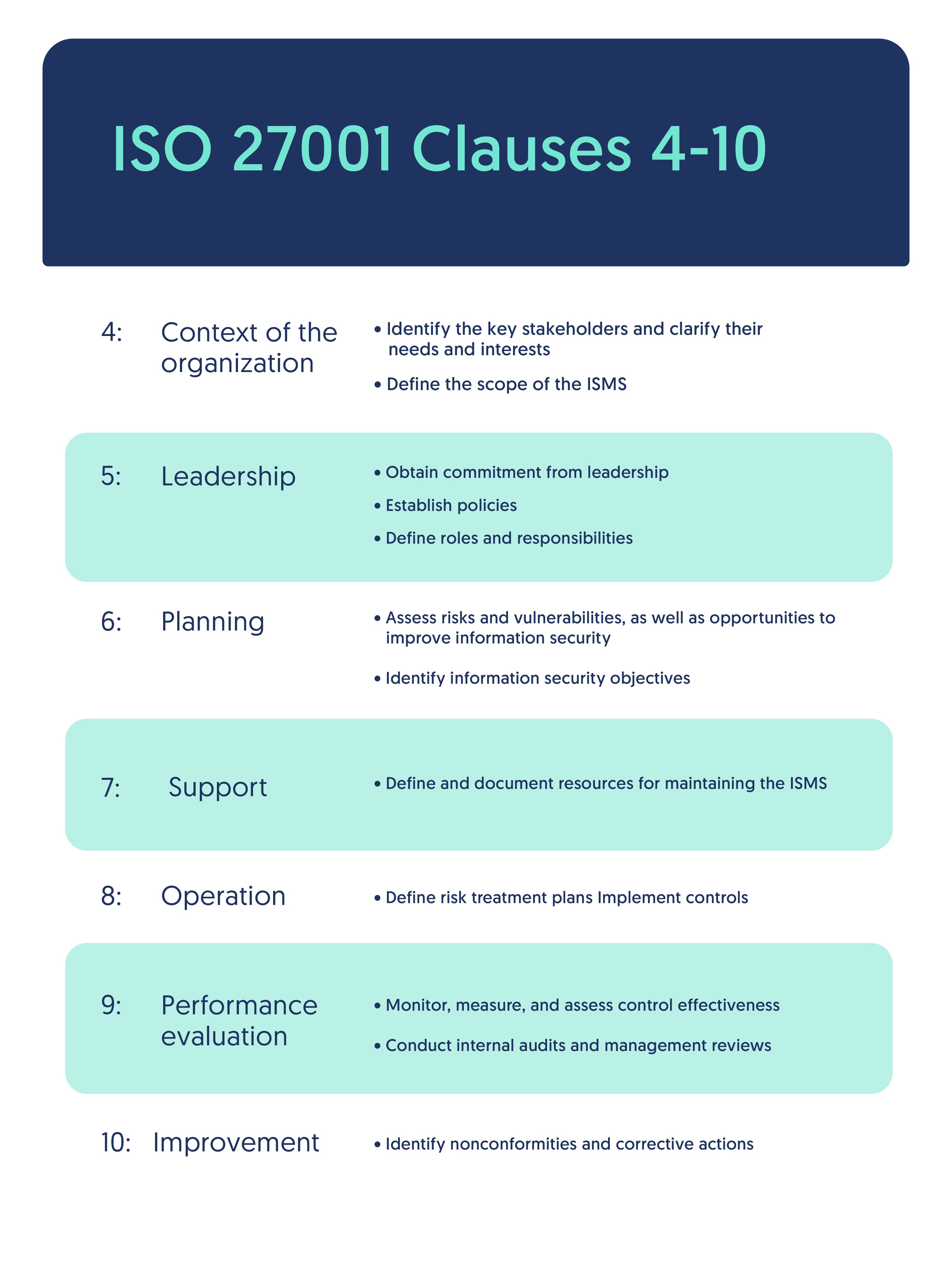
Clause 4 – Context of the Organization
- Identify internal & external issues.
- Identify stakeholders and their requirements.
- Define ISMS scope.
Clause 5 – Leadership
- Management commitment.
- Establish information security policy.
- Assign roles & responsibilities.
Clause 6 – Planning
- Risk assessment & risk treatment planning.
- Set information security objectives.
- Select controls from Annex A.
Clause 7 – Support
- Resources allocation.
- Competence & training.
- Awareness programs.
- Documented information & control of documents.
Clause 8 – Operation
- Implement and operate ISMS controls.
- Perform risk treatments.
- Maintain documented operational processes.
Clause 9 – Performance Evaluation
- Monitoring, measurement & analysis.
- Internal audits.
- Management review.
Clause 10 – Improvement
- Non-conformity handling.
- Corrective actions.
- Continual improvement of ISMS.
2. Annex A Control Domains (14 Domains)
ISO 27001 Annex A contains 114 controls across 14 domains.
- A.5 – Information Security Policies
- A.6 – Organization of Information Security
- A.7 – Human Resource Security
- A.8 – Asset Management
- A.9 – Access Control
- A.10 – Cryptography
- A.11 – Physical & Environmental Security
- A.12 – Operations Security
- A.13 – Communications Security
- A.14 – System Acquisition, Development & Maintenance
- A.15 – Supplier Relationships
- A.16 – Information Security Incident Management
- A.17 – Business Continuity Management
- A.18 – Compliance
This list itself is commonly asked in both short-answer and long-answer questions.
3. PDCA Cycle (Plan–Do–Check–Act)
ISO 27001 is based on the continual improvement model known as PDCA.
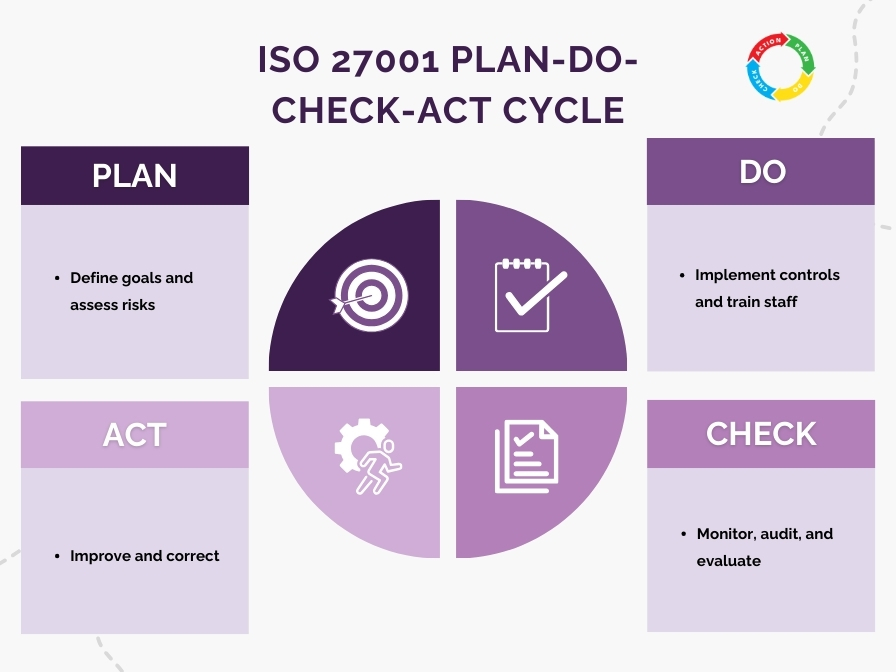
PLAN
- Establish ISMS scope.
- Identify risks.
- Define policies and objectives.
- Select controls.
DO
- Implement controls.
- Deploy processes & procedures.
- Train employees.
CHECK
- Monitor controls.
- Conduct internal audits.
- Review effectiveness.
ACT
- Implement corrective actions.
- Improve controls.
- Update risk assessments.
PDCA ensures ISMS remains effective and adapts to new threats.
4. Difference Between ISO 27001 and ISO 27002
ISO 27001
- Specifies requirements for establishing an ISMS.
- Mandatory for certification.
- Tells what controls must be in place.
ISO 27002
- Provides implementation guidelines for controls.
- Not certifiable.
- Tells how to implement controls.
In short:
27001 = Requirements
27002 = Practical guidance
Final Takeaway
These additions complete the exam-relevant portion of ISO 27001.
We now have:
- Clause breakdown (4–10)
- Annex A domains list
- PDCA explanation
- 27001 vs 27002 difference
This covers 100% of what universities expect for ISO 27001:2013 theory questions.